Tempo: keeping restaurant staff aligned during rushes
Client
End-to-End Application
(UX Academy Project)
Timeline
14 Weeks | 2025
ROLE
UX / UI Design
Situation
During peak service hours, restaurant teams rely on constant updates to stay coordinated and aligned, helping the line and floor adapt as conditions change.
Context
Communication was spread across verbal callouts, handwritten notes, and multiple tools—often leading to missed information in already high-pressure environments.
Complication
When updates aren’t surfaced at the right time or to the right role, small breakdowns quickly compound into stress, confusion, and slower decision-making during service.
The Spark : A problem I lived through for years
I spent years working in restaurants, and one thing became impossible to ignore: small communication breakdowns cause outsized chaos. A single out-of-stock item, a missed shift note, or a last-minute change could ripple through service — stressing the team and affecting the guest experience.
What stood out to me wasn’t just that information was missing — it was that it arrived too late, in the wrong place, or not at all. Updates lived in group chats, handwritten notes, or quick verbal call-outs that disappeared as soon as the rush began.
I wanted to fix a problem I’d personally lived through. That curiosity became the foundation for Tempo — a tool designed to support the fast, unpredictable rhythm of restaurant work by making team updates clear, timely, and dependable.
Where Tempo fits within the Restaurant Tech Ecosystem
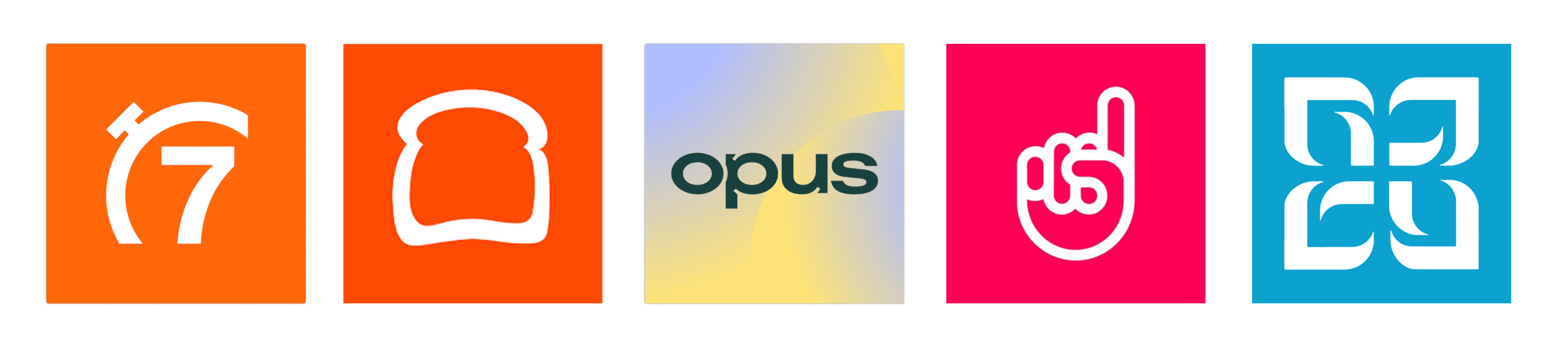
I evaluated established restaurant platforms to understand how teams currently manage scheduling, shifts, and communication. While these tools excel at operations, many fall short during the fast-paced moments that matter most—revealing opportunities for Tempo to support staff in real time, not just behind the scenes.

7 Shifts: Strong Scheduling + Shift Management
Toast: Robust POS + Reporting Tools
Opus: Training + Onboarding Platform
Typsy: Tip Pooling + Distribution
HotSchedules: Staff Scheduling + Labor Forecasting
Understanding the Restaurant Work Flow
Even though I knew this problem well, I didn’t want to design from memory alone. I interviewed five restaurant professionals across roles — managers, owners, and servers — to understand how communication actually played out during a real workday.
One pattern came up almost immediately: updates lived everywhere, and no one felt confident they had the full picture.
As I organized the interviews into an affinity map, a key difference emerged: timing
Managers needed visibility across the entire day — recurring issues, patterns, and what was coming next.
Servers, on the other hand, cared most about what had changed in the last hour.
That contrast reframed the goal for Tempo. It didn’t just need to post updates — it needed to deliver the right information, at the right moment, for each role.
Two people consistently represented these needs during interviews: Maya, a fast-paced server, and Andre, a front-of-house manager. Mapping their personas and empathy maps helped me step into their shifts — not just what they do, but what they’re thinking, feeling, and juggling in the moment. Seeing their workflows side by side made it clear how differently timing, context, and stress shape their needs during service.
“Every second counts—one minute in a restaurant is a lot of time."
“Ran out of pizza dough—nobody knew until tickets were run up.”
Designing Tempo's Structure & Flows
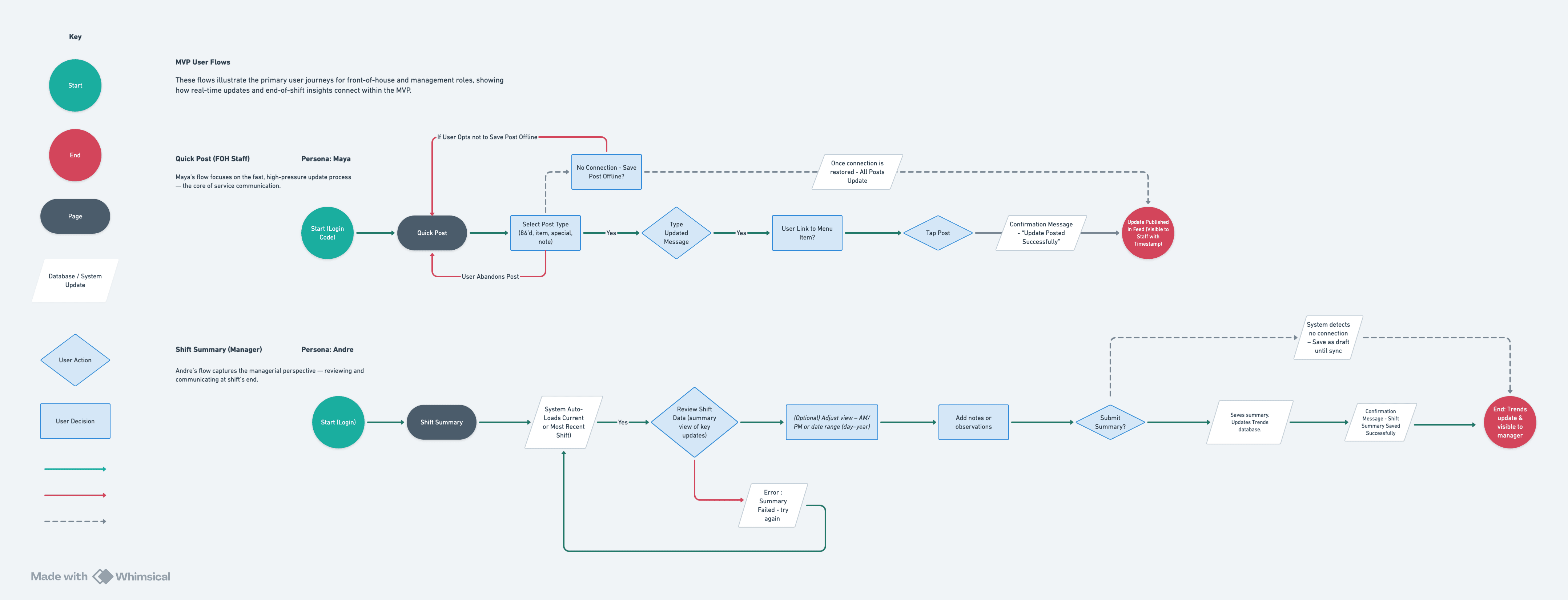
Building on persona and journey insights, I defined Tempo’s MVP structure to separate shared and role-specific tools clearly. The sitemap helped clarify navigation and ensure both managers and staff could quickly access what mattered most during and after a shift.
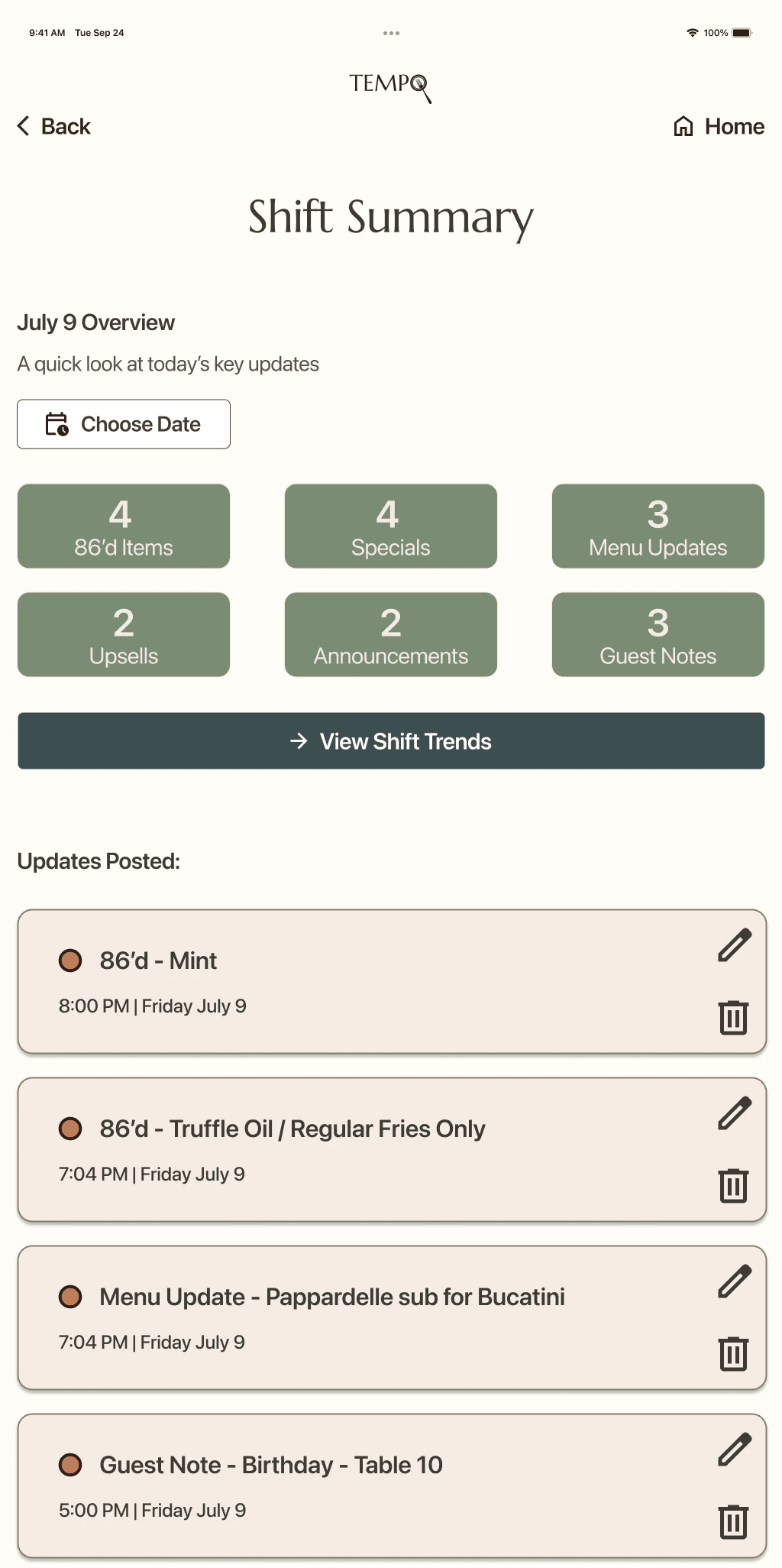
With the structure in place, I mapped the two most critical workflows—real-time updates from front-of-house staff and end-of-shift summaries from managers. These user flows reflect the distinct needs uncovered in research: servers prioritizing speed and immediacy, and managers needing visibility, patterns, and context over time.
Designing and validating these role-based flows early ensured Tempo supported fast decision-making without adding cognitive load during high-pressure moments. The flows also surfaced edge cases like offline posting and failed submissions, helping define system behavior before moving into higher-fidelity design.
Looking Ahead : Evolving Tempo beyond the MVP - Feature Roadmap
While Tempo was explored as a concept supported by research and testing, this roadmap outlines how I intentionally scoped the designed MVP and identified future opportunities. “Now” represents features prioritized in the initial design phase, while “Next” and “Later” reflect how the product could responsibly evolve if built and validated in the real world.
Now (Designed MVP)
Real-time Feed Updates
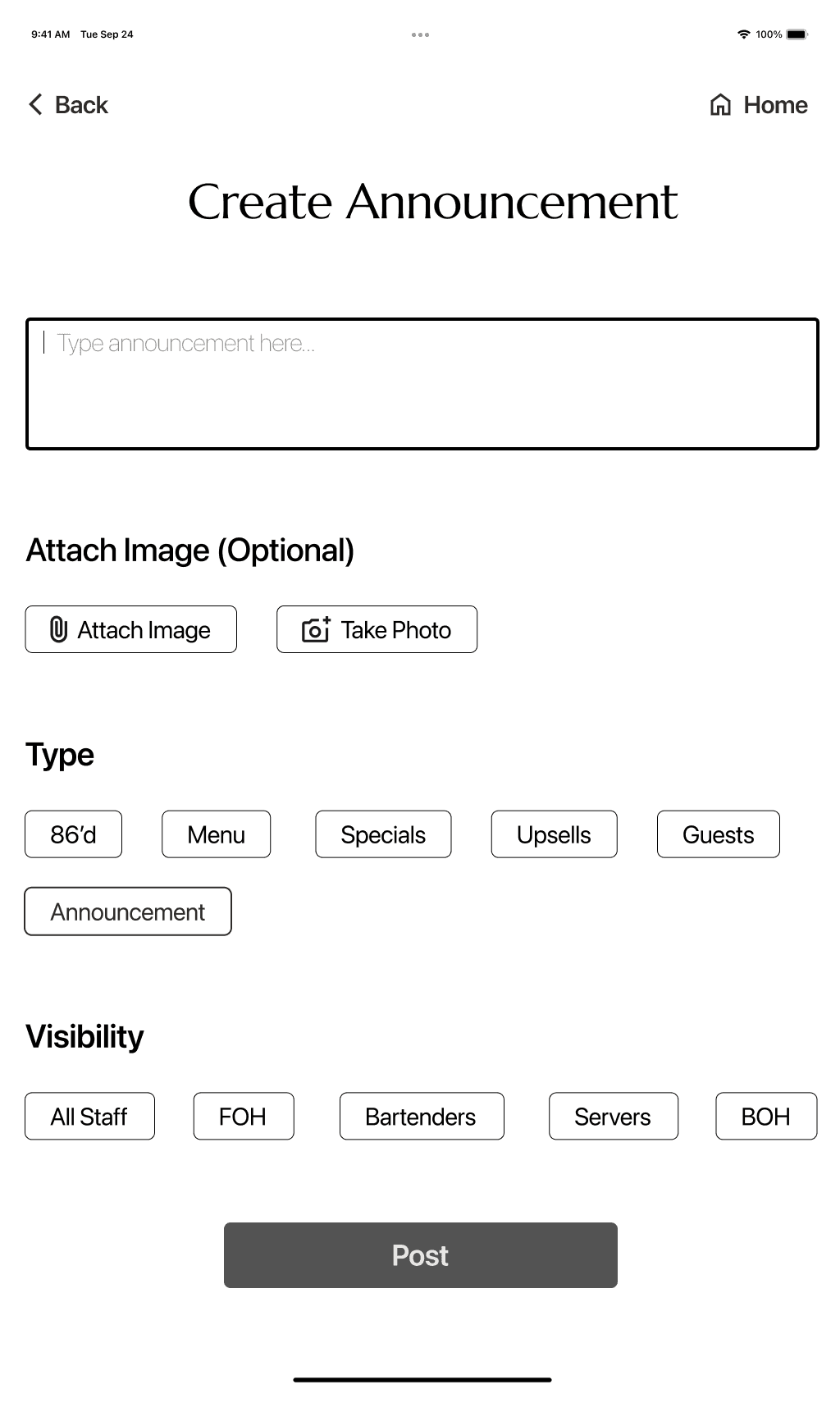
Create Announcement Interface
Shared Device Access
Offline Capability
Role-Based Visibility
Shift Summary Overview
Clear Update Categories
Timestamps & Unread Indicators
Next (Post-Validation Enhancements)
POS System Integration
Offline Capability
"seen by" acknowledgement
Later (Future Opportunities)
Manager analytics dashboard
Team recognition/reflection
micro-training / tips
Intelligence Insights
Multi-Location Management
Designing for Different Realities
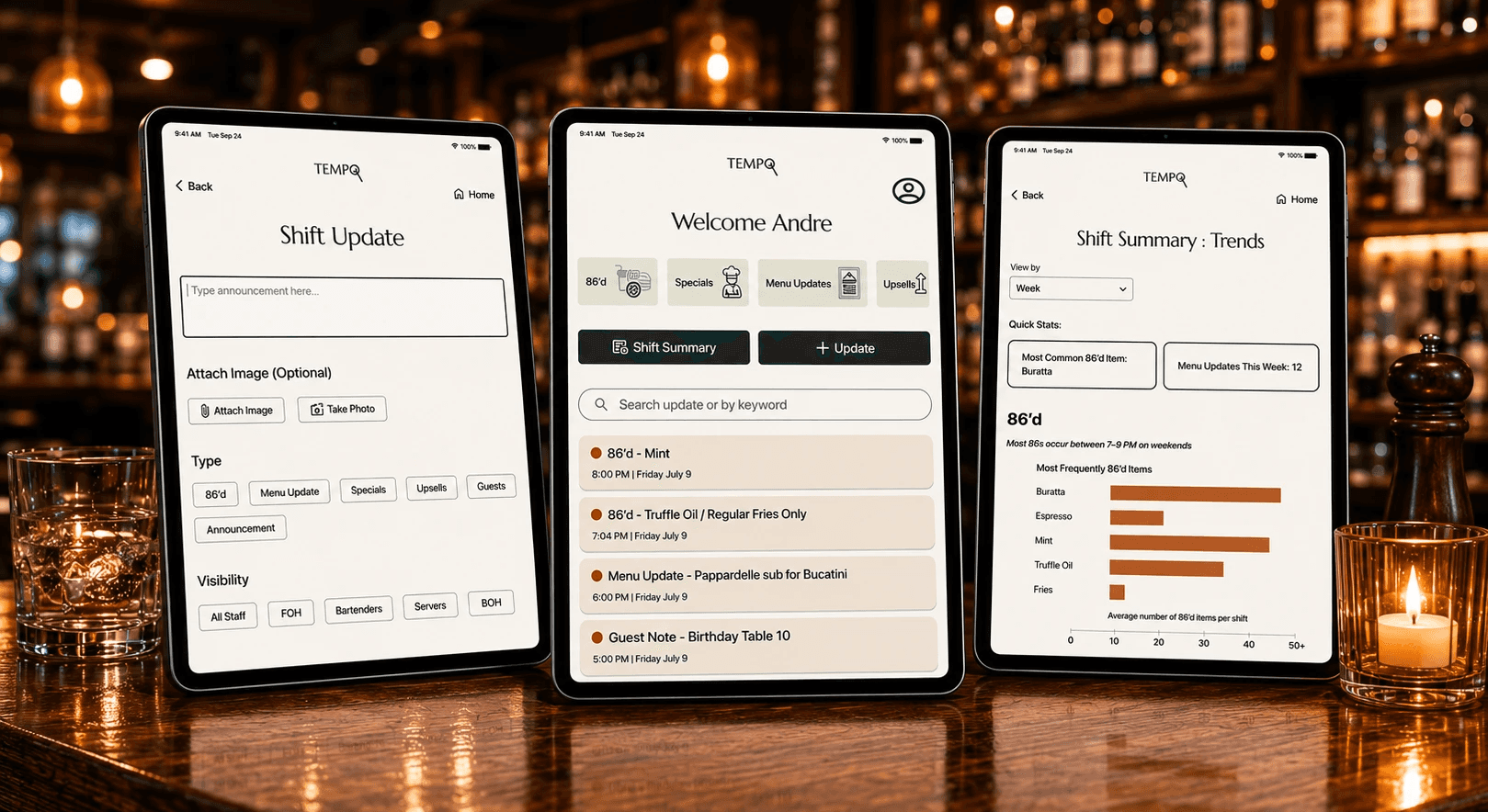
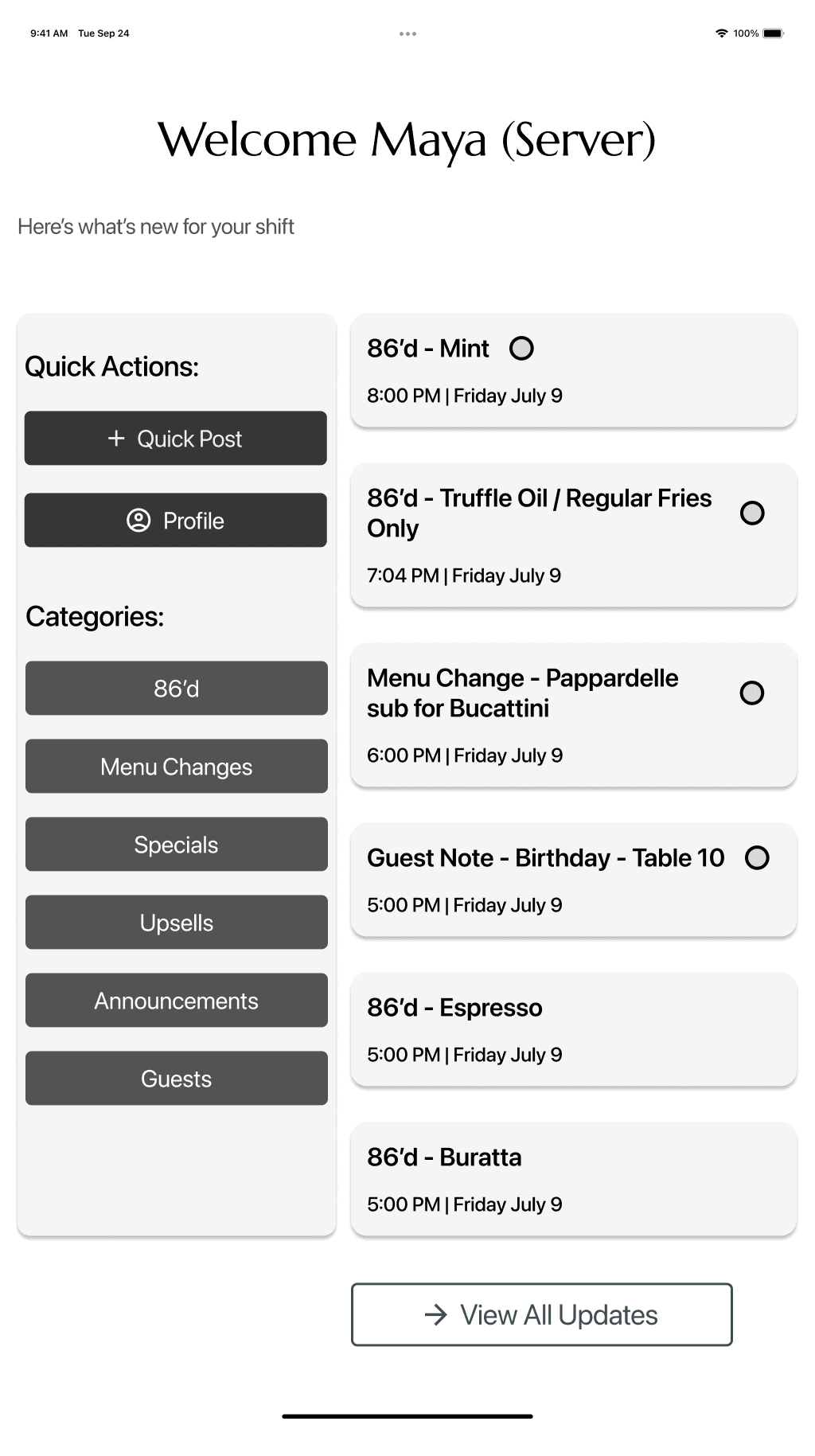
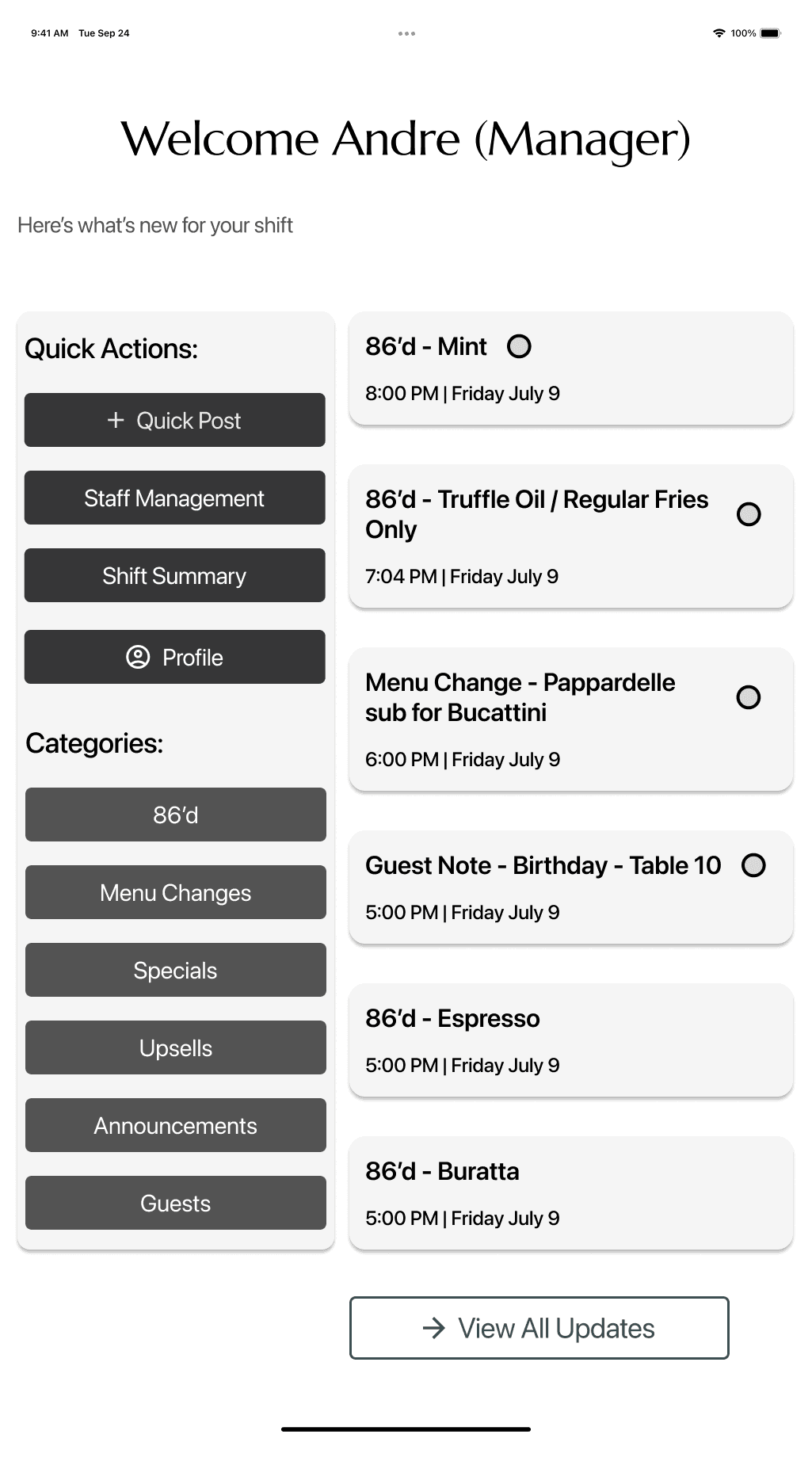
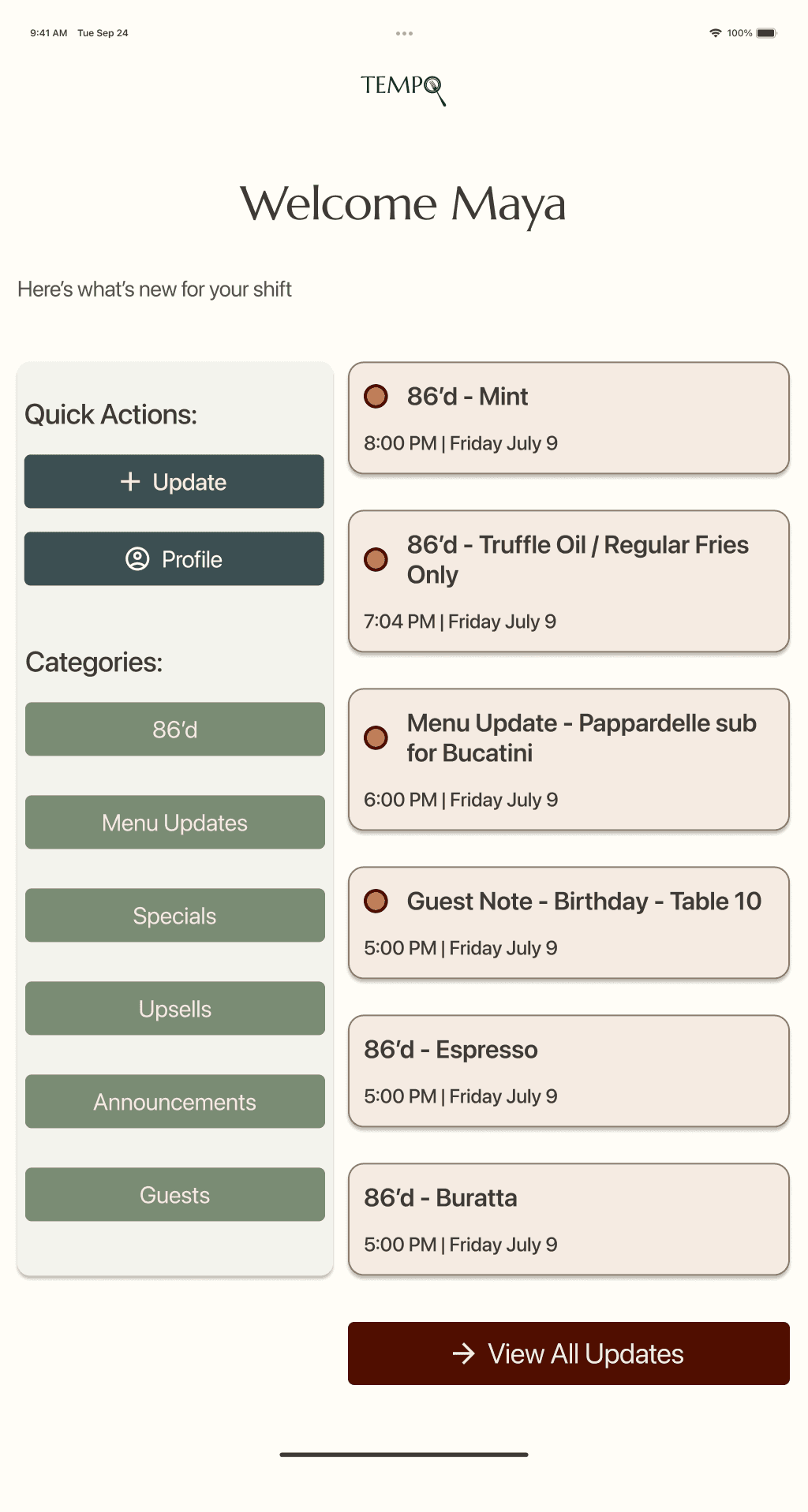
With those insights in mind, I designed role-based dashboards shaped around daily priorities — rather than identical screens for every user.
Managers could:
Post updates
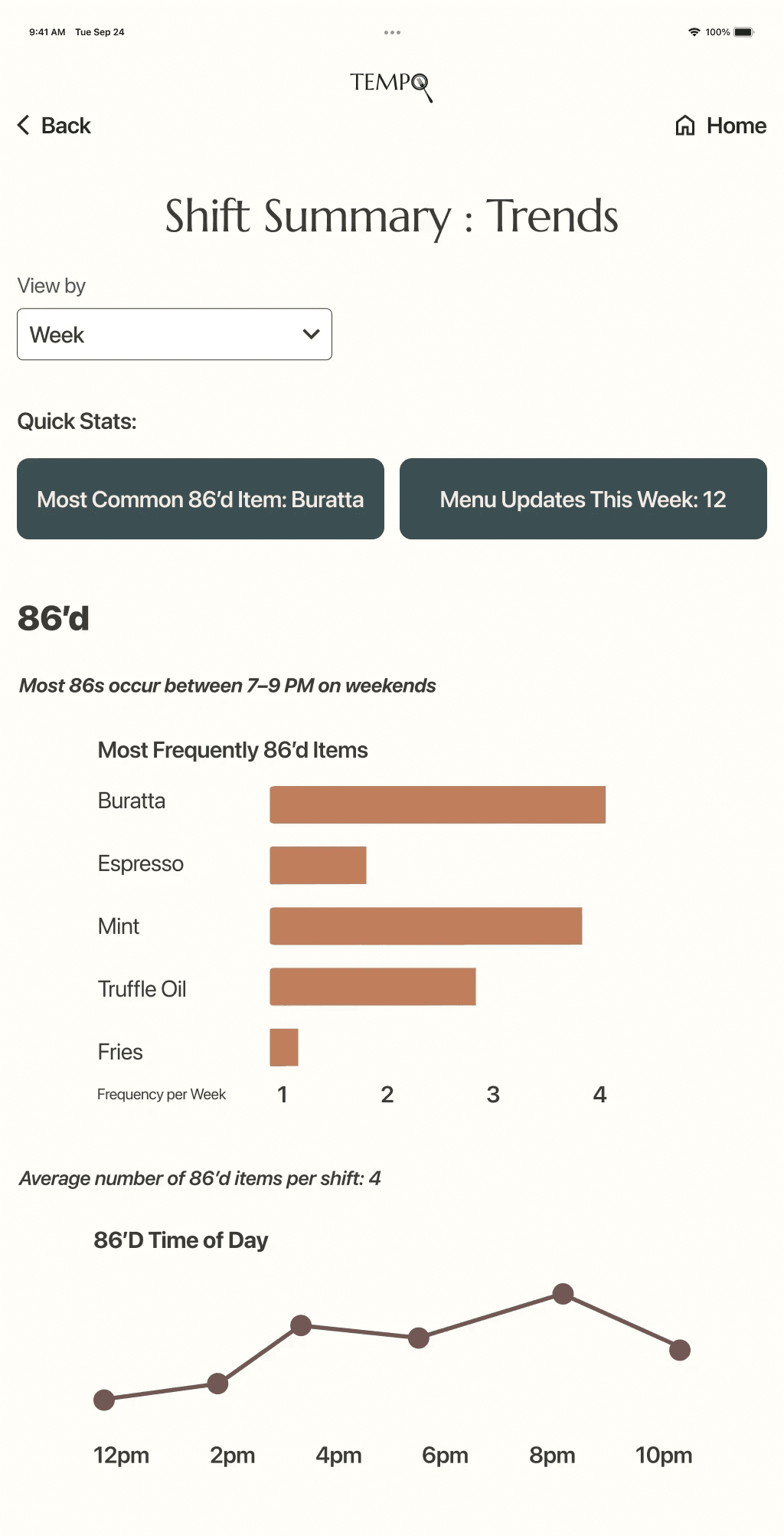
Track patterns like recurring out-of-stocks
Stay organized across shifts
Servers could:
Quickly scan shift-specific updates
See what changed most recently
Get back to service without digging
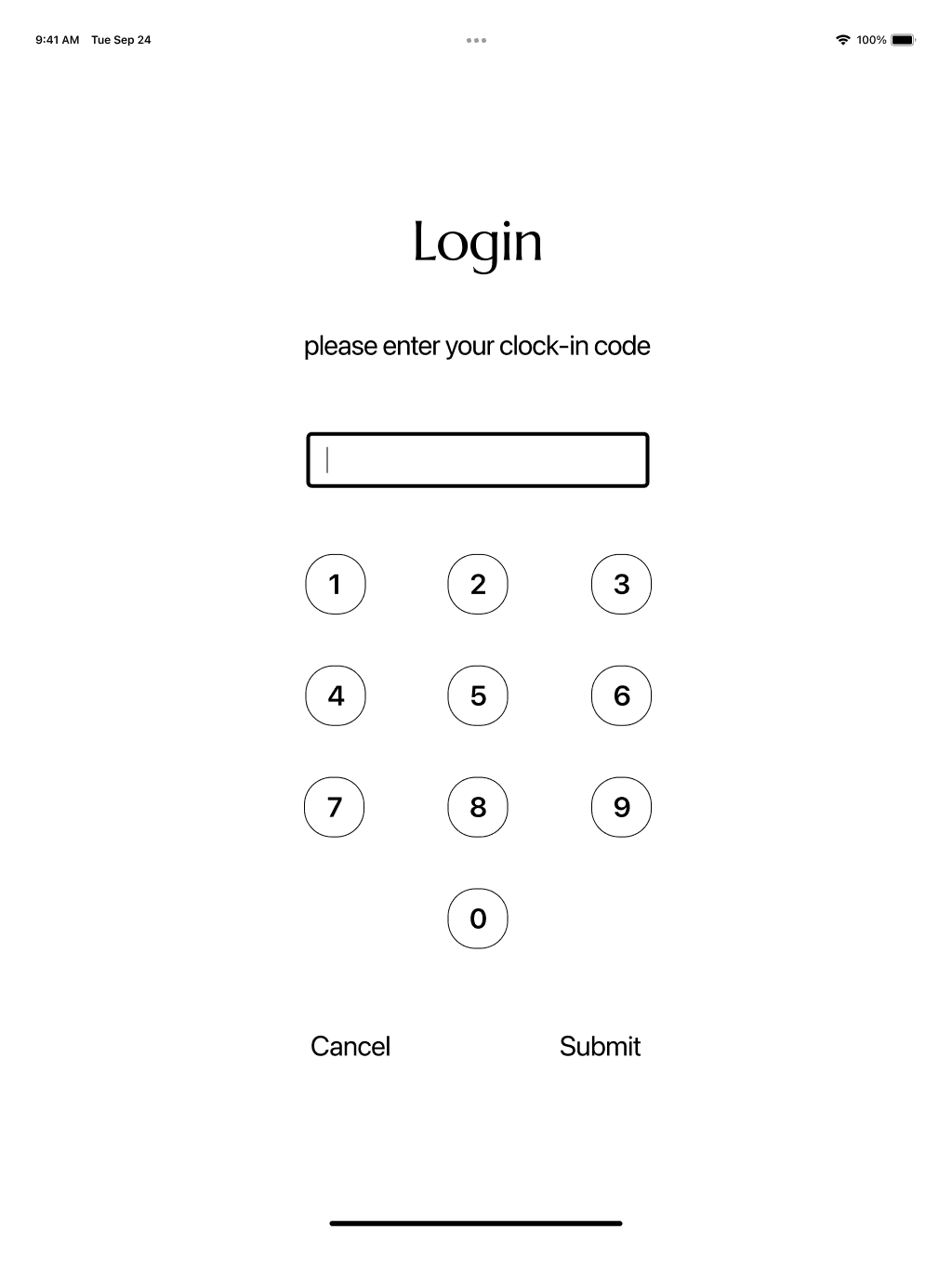
Because Tempo is often accessed during service, I designed the experience for shared tablet use — prioritizing large tap targets, clear hierarchy, and layouts that remain readable in low-light, fast-moving environments. Since staff don’t always have their phones readily available, a quick login code allows individuals to access role-specific updates and track what they’ve already seen, even on shared devices.
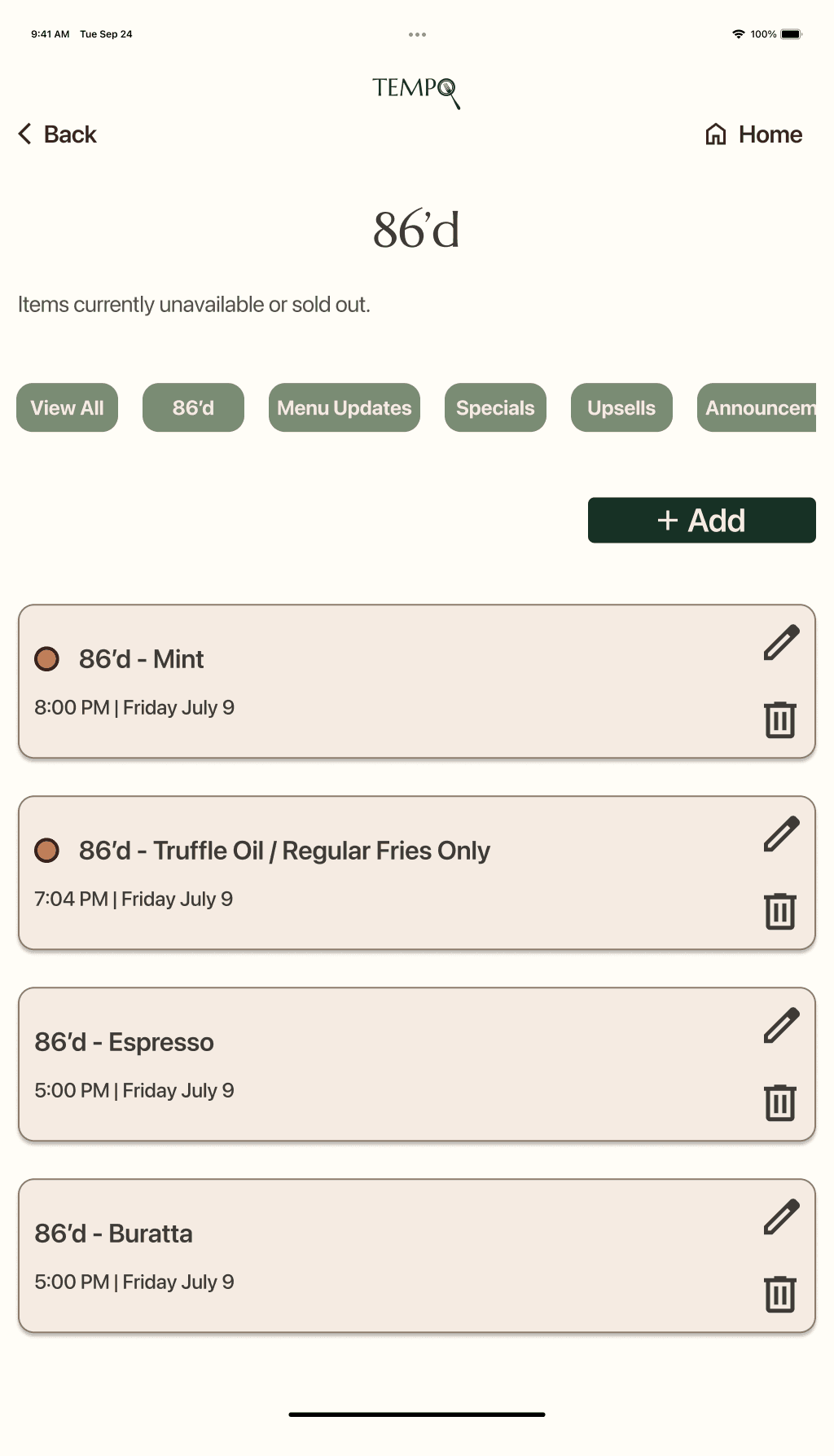
To reduce noise, I introduced clear update categories such as — Menu Updates, Guest Notes, and Announcements — helping teams filter information at a glance.
Validating Flows Before Branding
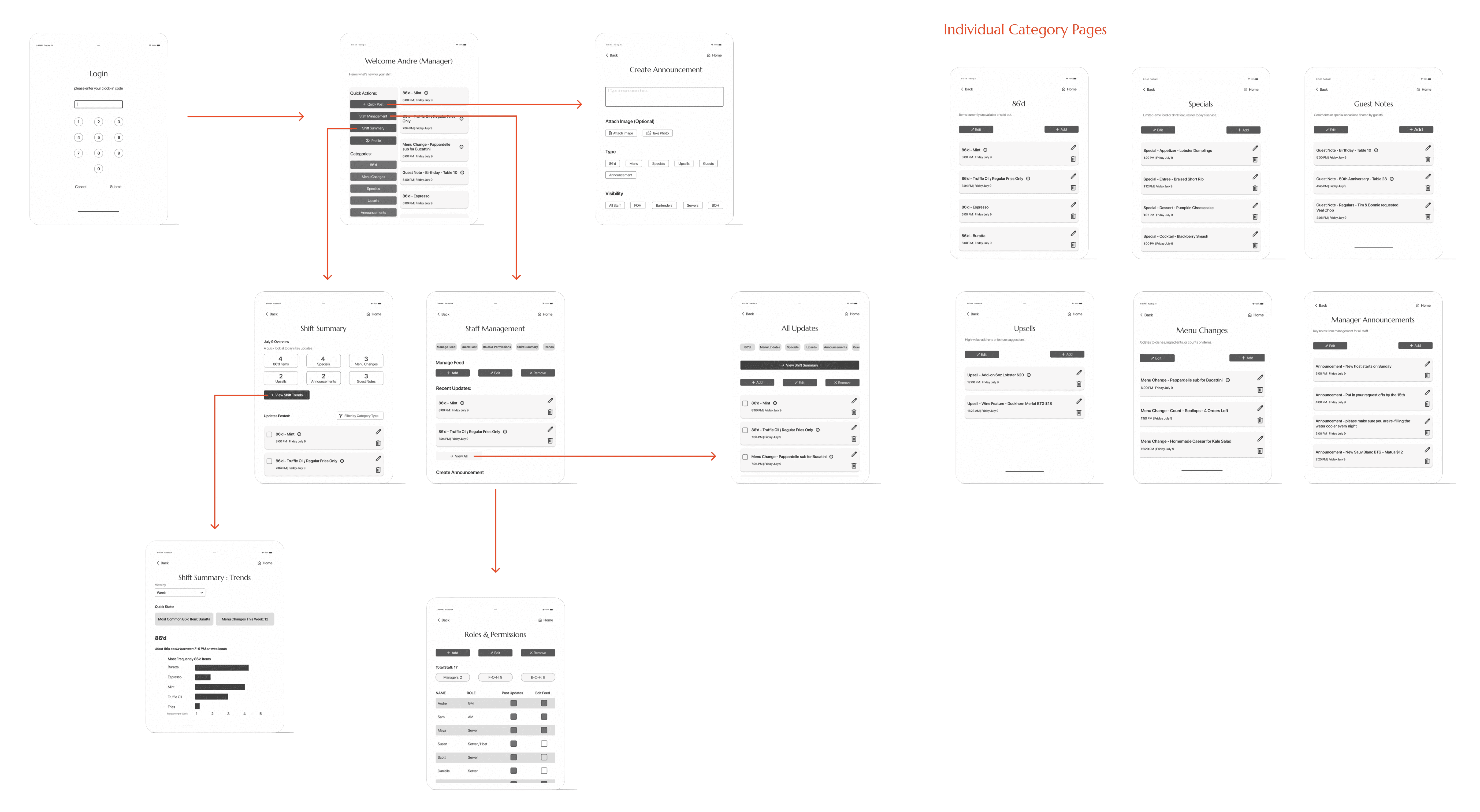
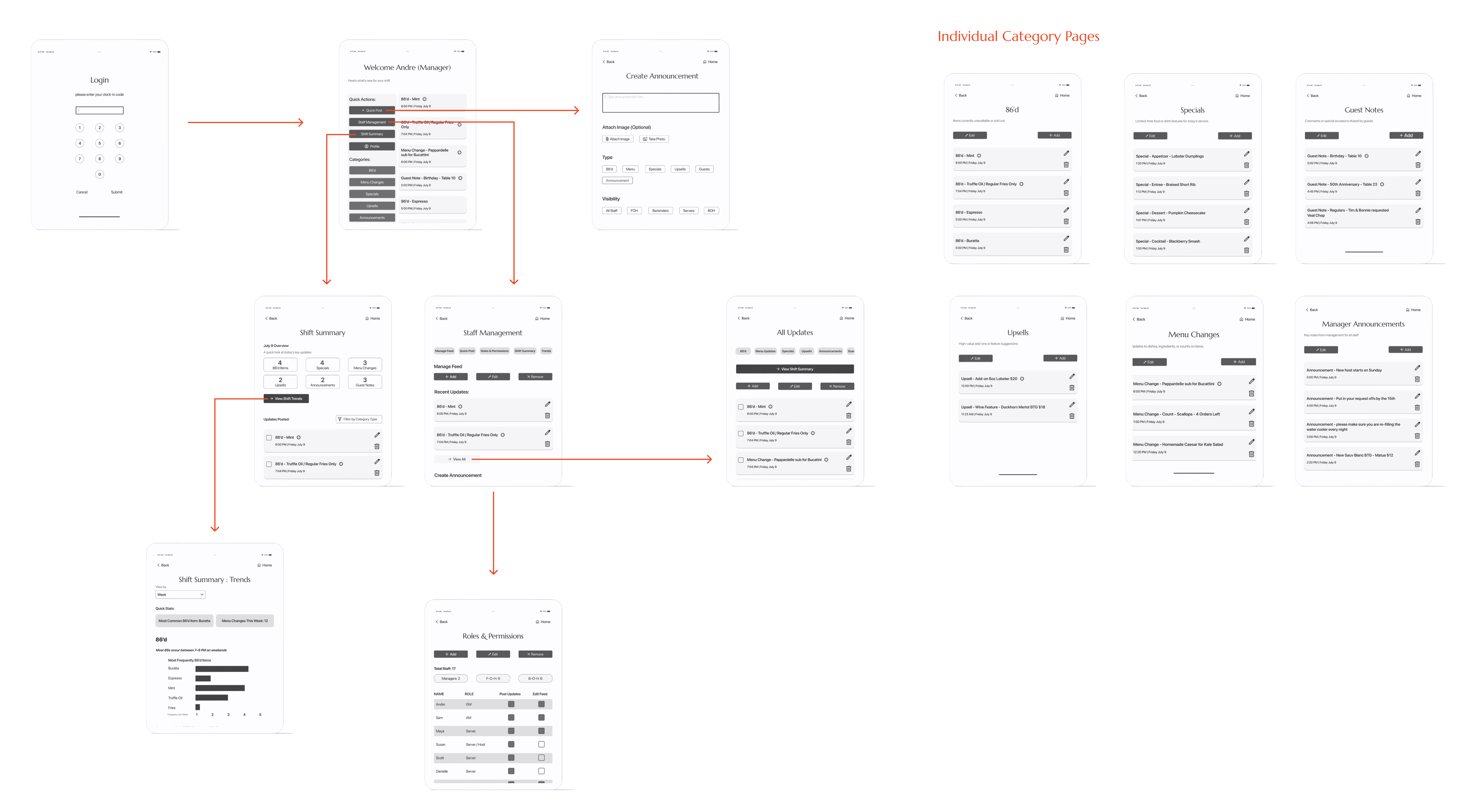
Before applying visual branding, mid-fidelity testing focused on how managers and staff navigate the system, interpret role-specific terminology, and locate critical updates through realistic task scenarios. While both roles were validated, manager workflows are shown here to highlight the most complex decision paths.
Testing surfaced opportunities to
clarify language
improve notification cues
refine filtering behavior
At the same time, testing confirmed that the underlying structure supported fast comprehension and confident use.
Creating Calm in the Middle of Chaos
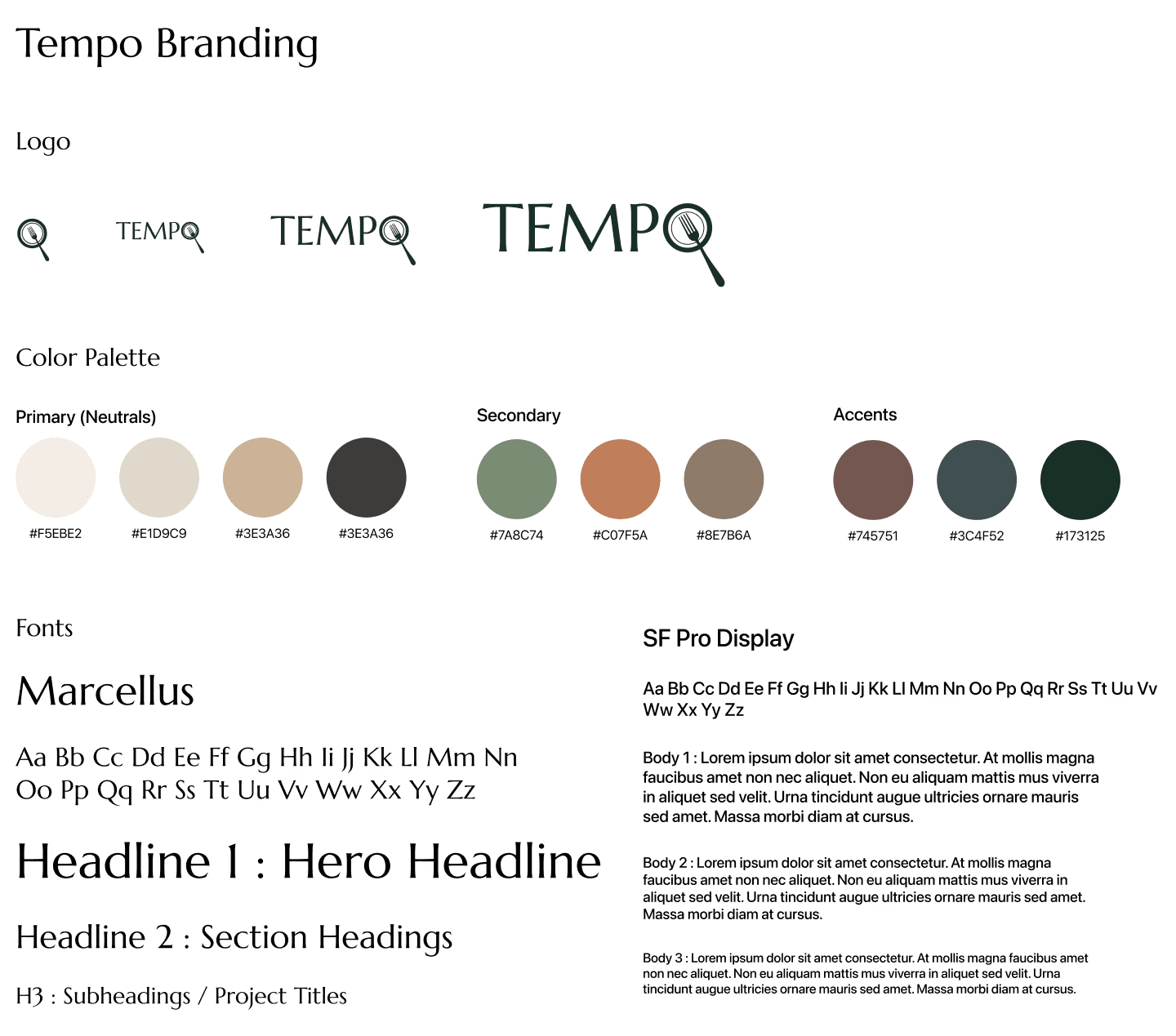
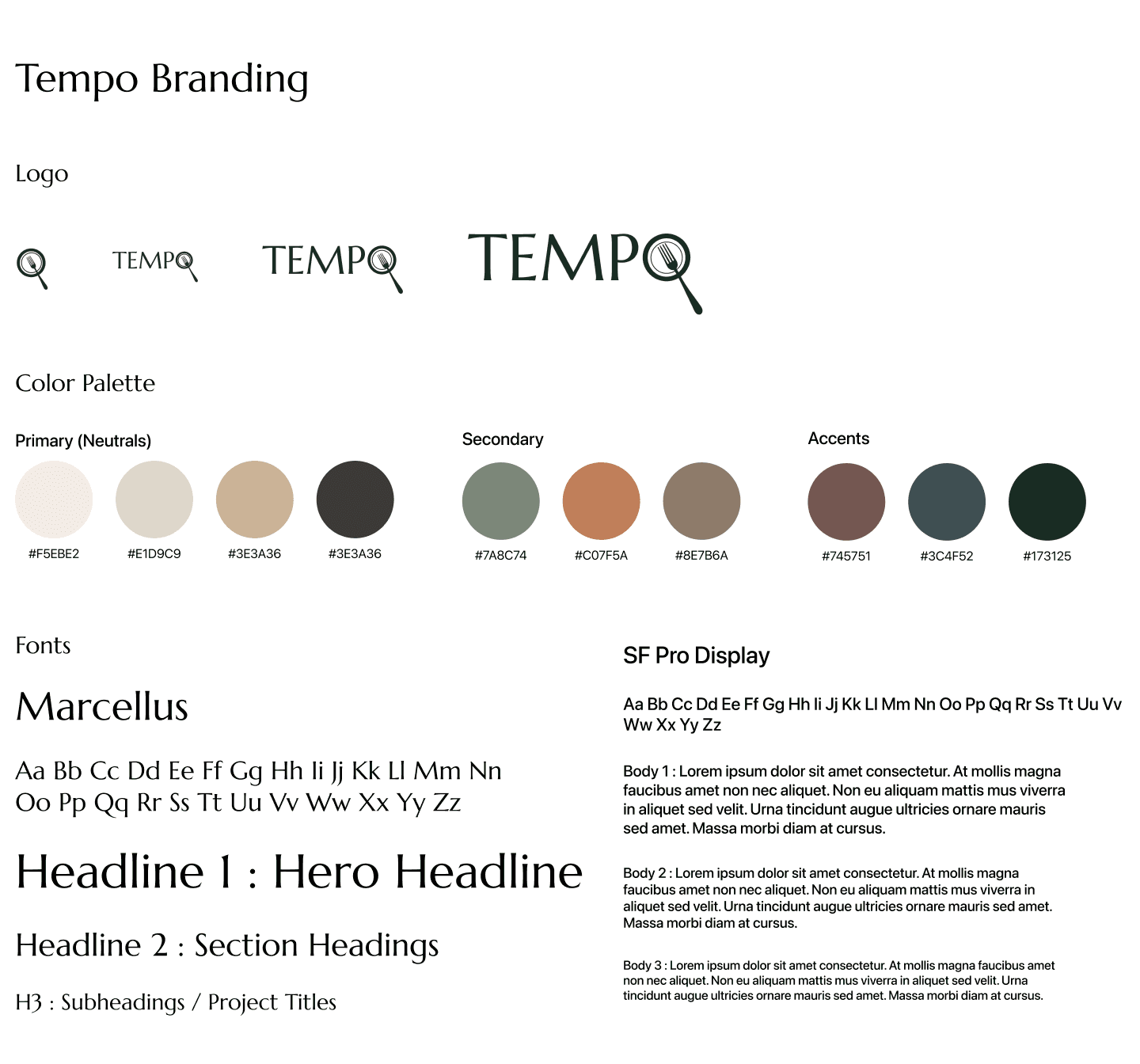
Tempo’s visual identity was designed to introduce clarity and steadiness into a fast-paced, high-pressure environment. Warm, grounded colors and easy-to-read typography help reduce visual noise, making critical updates faster to scan and simpler to process — even during a busy service.
The goal was to give users a sense of pause — almost like taking a quick breath — when locating the information they need. Clear hierarchy, restrained color use, and minimal branding choices work together to support focus rather than compete for attention.
The name Tempo reflects the rhythm of front-of-house work: once service begins, the team finds a groove, moving fluidly from table to table in a steady flow. The logo subtly incorporates a plate and fork, grounding the brand in the restaurant industry while keeping the mark familiar, functional, and unobtrusive in daily use.
Designing for Speed, Simplicity, and Accessibility
Mid-fidelity testing revealed a consistent theme: less is more.
Five restaurant professionals completed navigation and comprehension tasks in Figma. While the overall structure tested well, feedback showed that unclear labels and extra elements slowed decision-making during service.
In response, I simplified terminology, removed ambiguous interactions, and streamlined flows to reduce cognitive load. Categories proved effective for quickly finding critical updates, while navigation patterns like Home and Back were validated as complementary.
These refinements shaped the first high-fidelity version of Tempo — creating an experience that feels clear, predictable, and supportive during high-pressure service moments.
Usability Testing
Task Completion
Goal: 80–90% of participants complete tasks without help
Result: 100% of users completed all tasks successfully
Ease of Use / Clarity Rating
Goal: Average rating of 4 or higher
Result: 4.8 / 5 average ease-of-use rating
Layout & Color Feedback
Goal: Positive response to overall visual feel
Result: Described as “calm,” “organized,” “earthy,” and “not busy.”
Role Clarity
Goal: Clear distinction between Manager and Server flows
Result: All participants easily understood the difference between roles and their screens
Navigation & Label Understanding
Goal: Minimal confusion with navigation or terminology
Result: No major confusion; only small text clarity suggestions
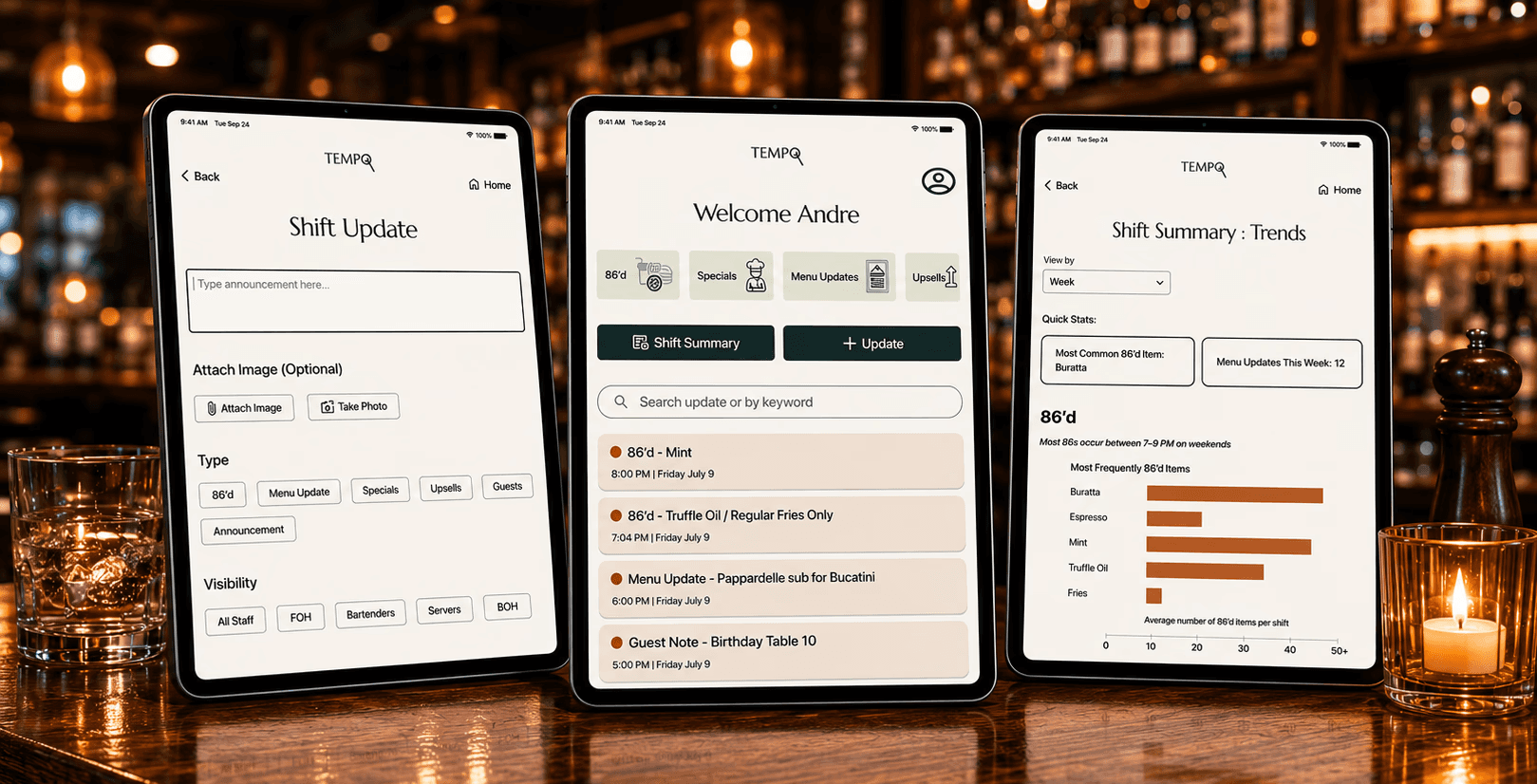
Andre Task: View Shift Summary Trends
Maya Task: Create a "Quick Post" upload to All Staff
Refining Through Testing
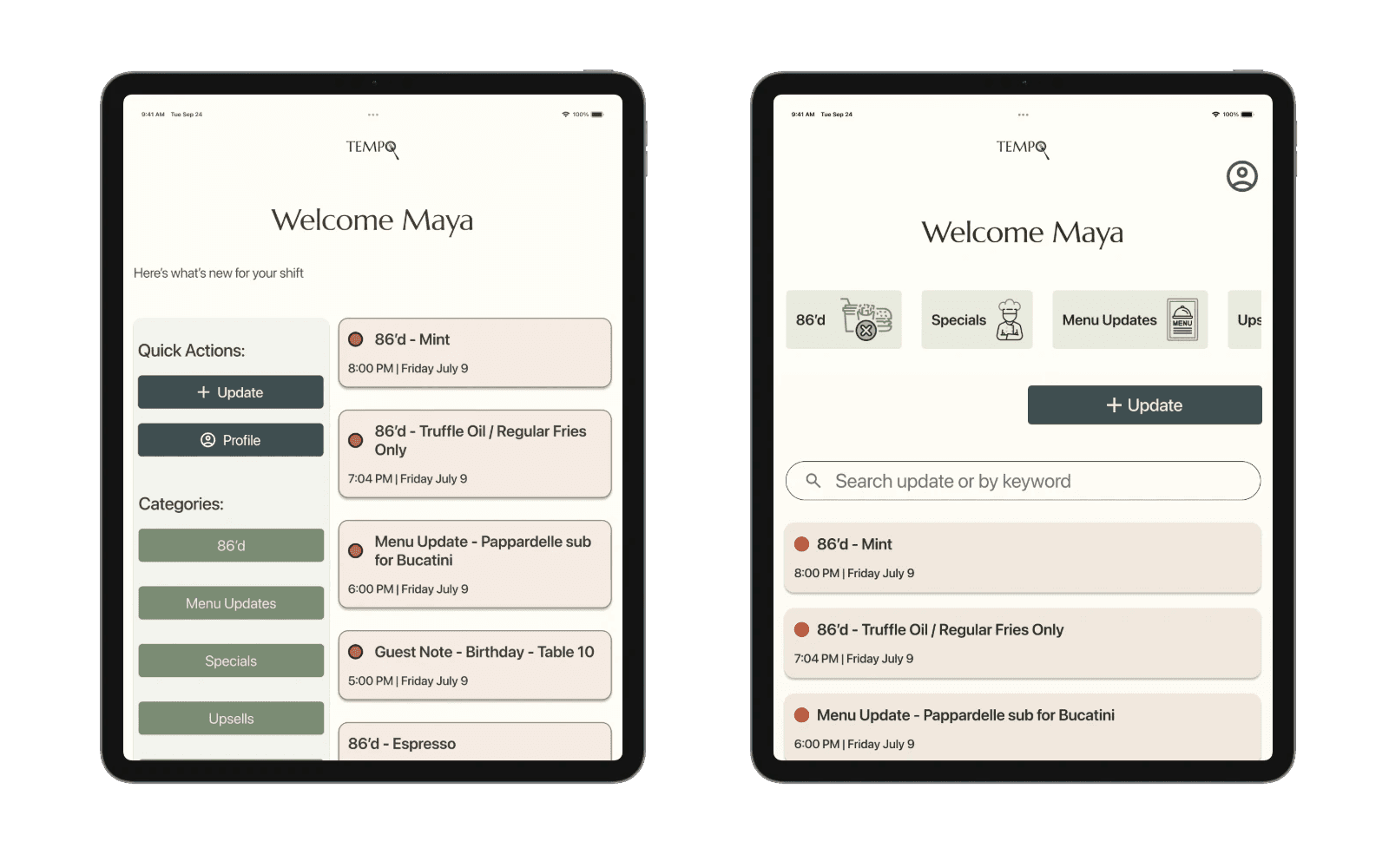
I ran two rounds of usability testing with both managers and servers using mid- and high-fidelity prototypes.
A few friction points surfaced quickly:
Users hesitated over unclear labels
Recent updates weren’t immediately obvious
Some navigation patterns felt unfamiliar under time pressure
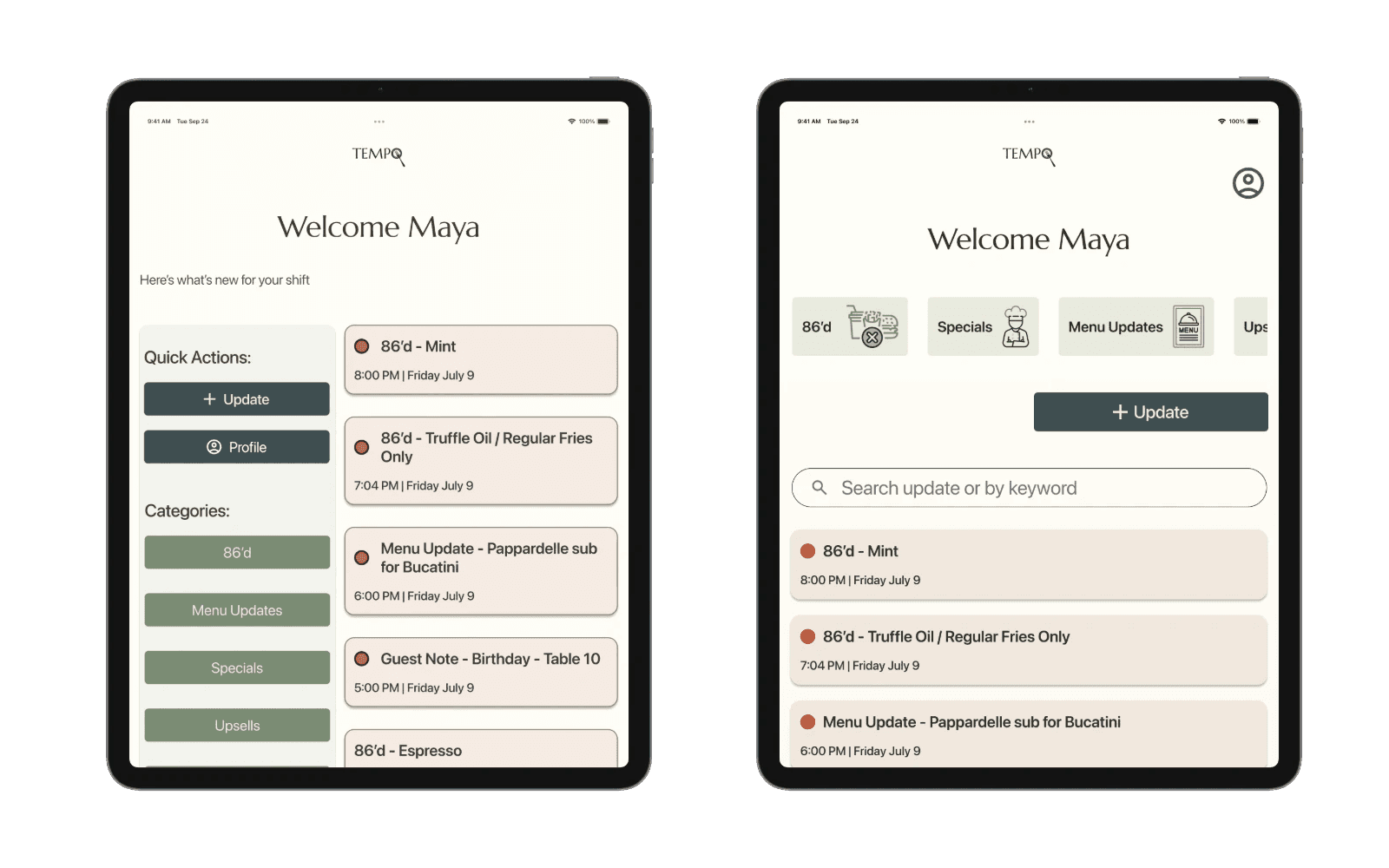
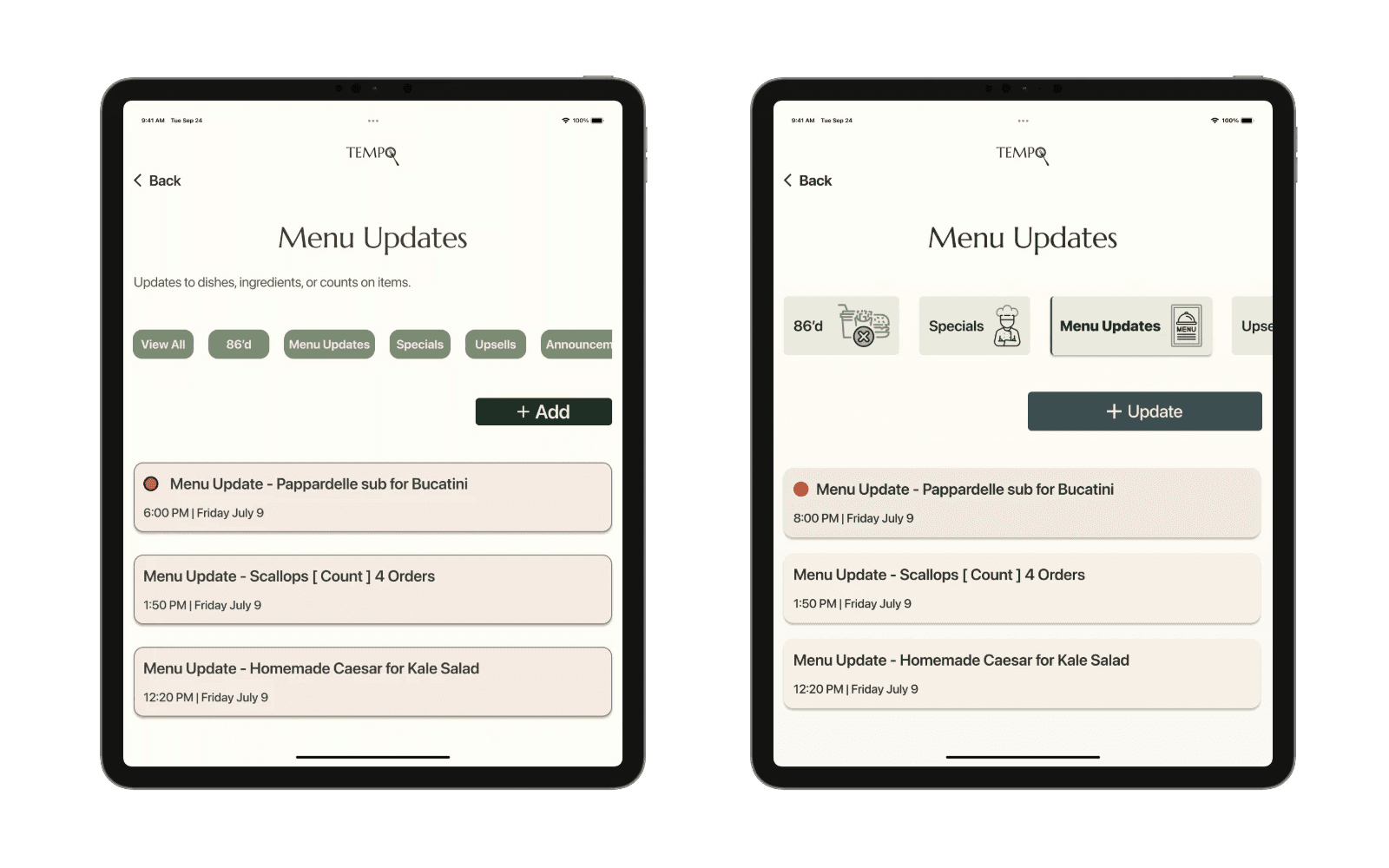
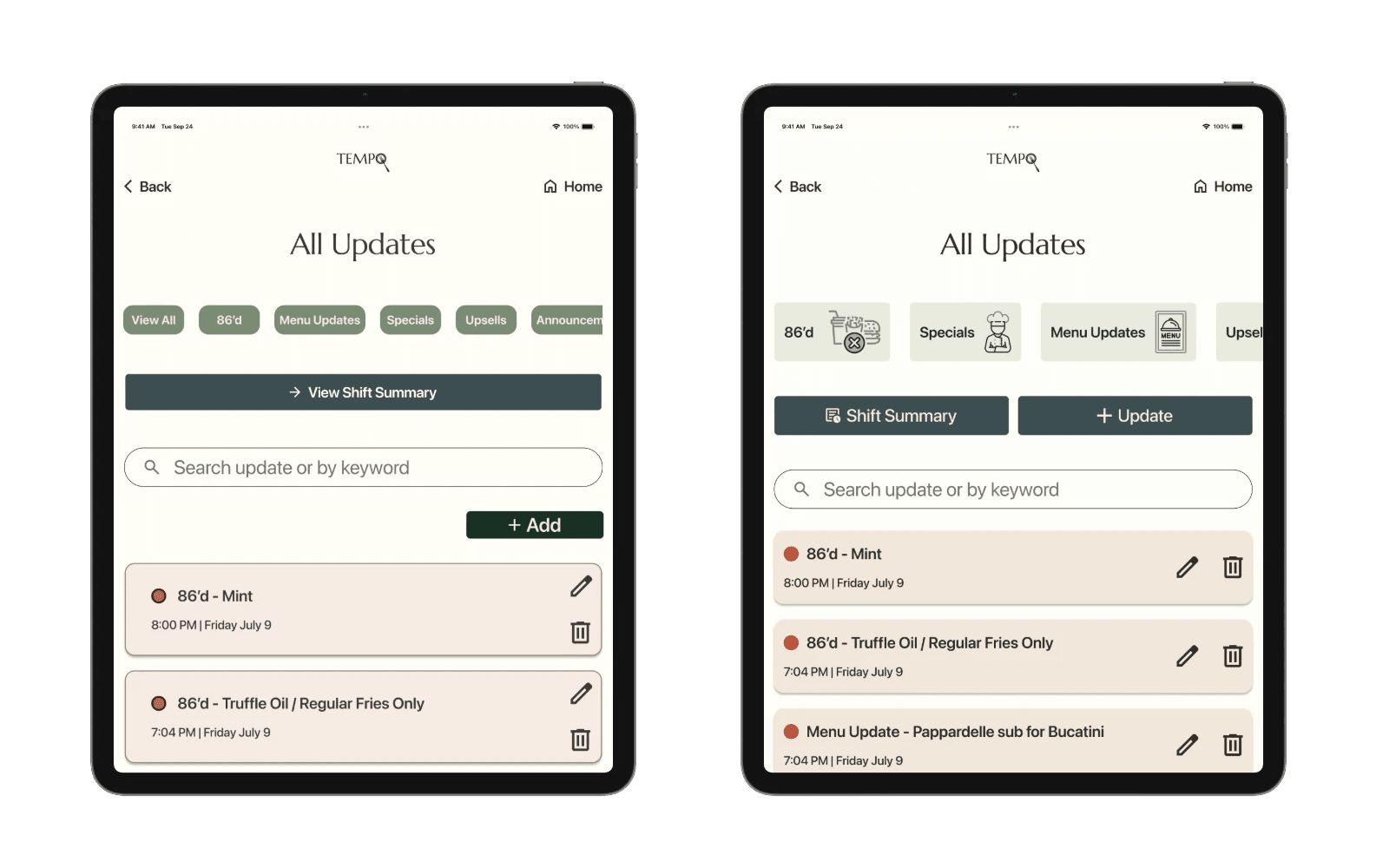
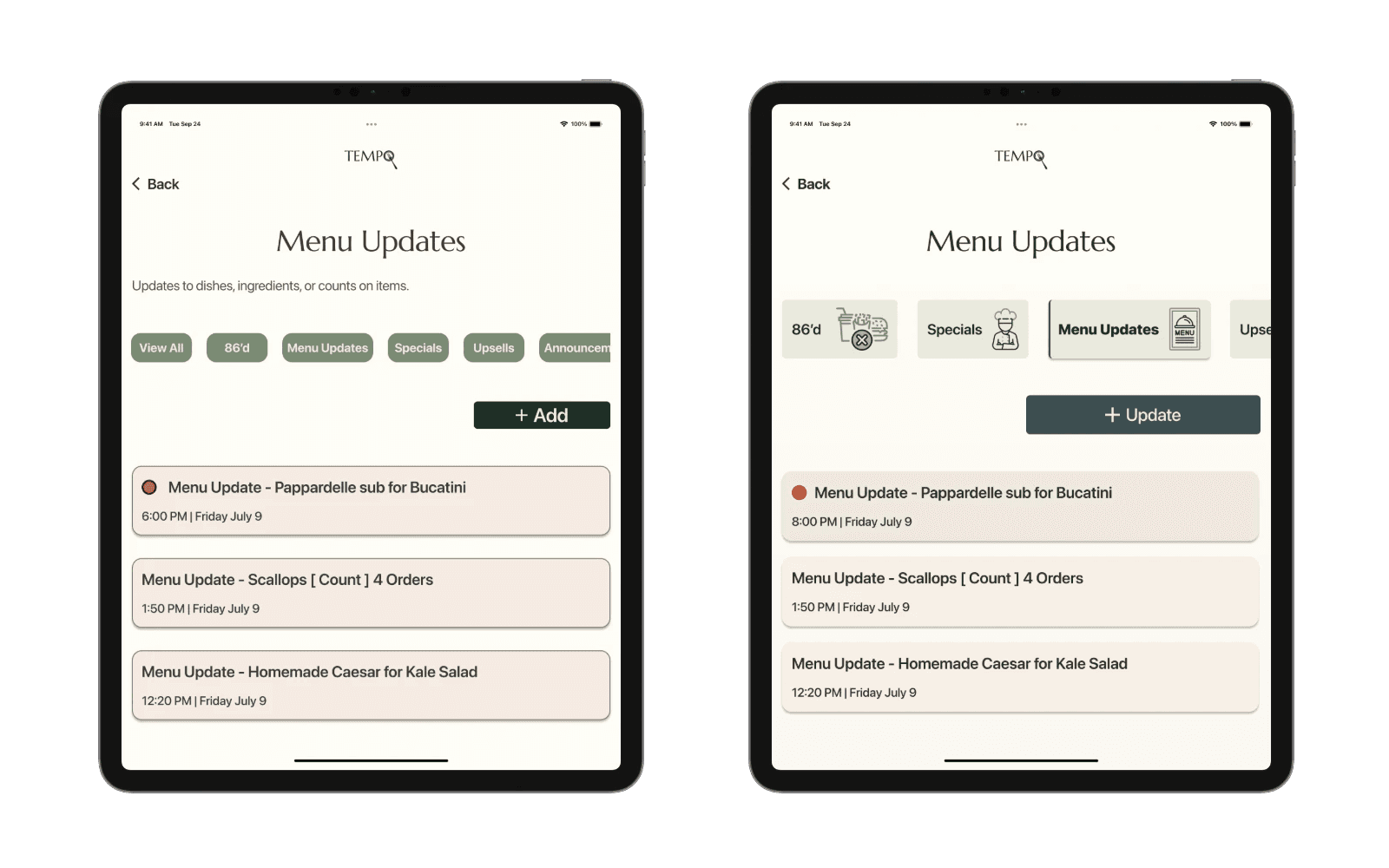
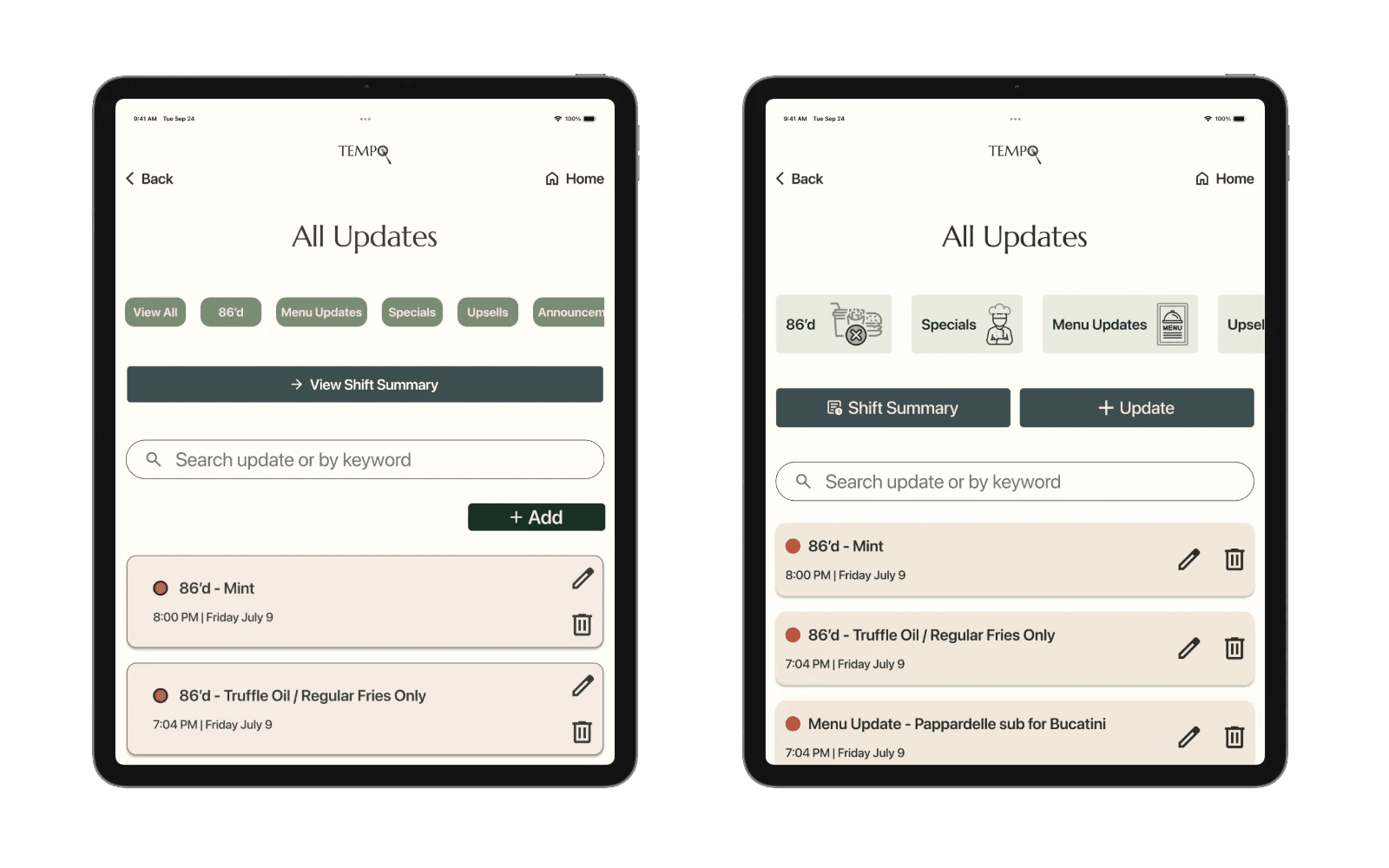
In response, I reduced cognitive load by adjusting language, hierarchy, and what mattered most in the moment.
Specifically:
Simplified labels using familiar restaurant terminology
Prioritized time-sensitive content at the top of each view
Reduced decision-making by clarifying hierarchy
I also refined micro-interactions — scroll feedback, button states, and transitions — to make the product feel faster and more responsive. Testers described the updated experience as “quicker” and “less cluttered.”
Dashboard Before
Dashboard After
Category Chips & CTA Before
Category Chips & CTA After
Update Cards Before
Update Cards After
Bringing Tempo to Life
Tempo demonstrated how a single source of truth could replace scattered communication with a single, trusted source of truth.
The prototype showed:
Real-time updates shared across roles
Clear visibility for managers into recurring operational issues
Faster, lower-stress information access for servers
I refined spacing, hierarchy, and component consistency to maintain a sense of visual calm across screens. Testing validated the core concept and surfaced clear next steps for future iterations — including analytics for managers and smarter update prioritization.
Ultimately, Tempo demonstrated how thoughtful design could reduce staff frustration, improve operational flow, and better support guest experiences.
Andre Final Design Prototype
Maya Final Design Prototype
Reflection
Designing for scale in restaurants:
I’d explore integrations with POS systems and support for multi-location restaurants. Communication challenges grow quickly across locations, and designing for scale would require preserving clarity while handling more complexity behind the scenes.
Refinements - Balancing calm with Personality:
Keeping the interface calm & scannable was essential — but this project pushed me to question how minimal is too minimal. If I revisited Tempo, I’d explore richer visual cues and more micro-interactions that add clarity & warmth without disrupting focus.
What this project taught me:
Tempo reinforced how closely restaurant work and UX design are connected: both rely on timing, rhythm, and anticipating needs before they’re spoken. Designing for hospitality sharpened my ability to create experiences that support people when attention is limited and stakes are high.
Contact
Let's Make Something Great Together.
Thoughtful design is always collaborative - and the best work starts with a simple conversation.
Tempo: keeping restaurant staff aligned during rushes
Client
End-to-End Application
(UX Academy Project)
Timeline
14 Weeks | 2025
ROLE
UX / UI Design
Situation
During peak service hours, restaurant teams rely on constant updates to stay coordinated and aligned, helping the line and floor adapt as conditions change.
Context
Communication was spread across verbal callouts, handwritten notes, and multiple tools—often leading to missed information in already high-pressure environments.
Complication
When updates aren’t surfaced at the right time or to the right role, small breakdowns quickly compound into stress, confusion, and slower decision-making during service.
The Spark : A problem I lived through for years
I spent years working in restaurants, and one thing became impossible to ignore: small communication breakdowns caused outsized chaos. A single out-of-stock item, a missed shift note, or a last-minute change could ripple through service — stressing the team and affecting the guest experience.
What stood out to me wasn’t just that information was missing — it was that it arrived too late, in the wrong place, or not at all. Updates lived in group chats, handwritten notes, or quick verbal call-outs that disappeared as soon as the rush began.
I wanted to fix a problem I’d personally lived through. That curiosity became the foundation for Tempo — a tool designed to support the fast, unpredictable rhythm of restaurant work by making team updates clear, timely, and dependable.
Where Tempo fits within the Restaurant Tech Ecosystem
I evaluated established restaurant platforms to understand how teams currently manage scheduling, shifts, and communication. While these tools excel at operations, many fall short during the fast-paced moments that matter most—revealing opportunities for Tempo to support staff in real time, not just behind the scenes.
7 Shifts: Strong Scheduling + Shift Management
Toast: Robust POS + Reporting Tools
Opus: Training + Onboarding Platform
Typsy: Tip Pooling + Distribution
HotSchedules: Staff Scheduling + Labor Forecasting
Understanding the Restaurant Work Flow
Even though I knew this problem well, I didn’t want to design from memory alone. I interviewed five restaurant professionals across roles — managers, owners, and servers — to understand how communication actually played out during a real workday.
One pattern came up almost immediately: updates lived everywhere, and no one felt confident they had the full picture.
As I organized the interviews into an affinity map, a key difference emerged: timing
Managers needed visibility across the entire day — recurring issues, patterns, and what was coming next.
Servers, on the other hand, cared most about what had changed in the last hour.
That contrast reframed the goal for Tempo. It didn’t just need to post updates — it needed to deliver the right information, at the right moment, for each role.
Two people consistently represented these needs during interviews: Maya, a fast-paced server, and Andre, a front-of-house manager. Mapping their personas and empathy maps helped me step into their shifts — not just what they do, but what they’re thinking, feeling, and juggling in the moment. Seeing their workflows side by side made it clear how differently timing, context, and stress shape their needs during service.
“Every second counts—one minute in a restaurant is a lot of time."
“Ran out of pizza dough—nobody knew until tickets were run up.”
Designing Tempo's Structure & Flows
Building on persona and journey insights, I defined Tempo’s MVP structure to separate shared and role-specific tools clearly. The sitemap helped clarify navigation and ensure both managers and staff could quickly access what mattered most during and after a shift.
With the structure in place, I mapped the two most critical workflows—real-time updates from front-of-house staff and end-of-shift summaries from managers. These user flows reflect the distinct needs uncovered in research: servers prioritizing speed and immediacy, and managers needing visibility, patterns, and context over time.
Designing and validating these role-based flows early ensured Tempo supported fast decision-making without adding cognitive load during high-pressure moments. The flows also surfaced edge cases like offline posting and failed submissions, helping define system behavior before moving into higher-fidelity design.
Looking Ahead : Evolving Tempo beyond the MVP - Feature Roadmap
Now (Designed MVP)
Real-time Feed Updates
Create Announcement Interface
Shared Device Access
Offline Capability
Role-Based Visibility
Shift Summary Overview
Clear Update Categories
Timestamps & Unread Indicators
Next (Post-Validation Enhancements)
POS System Integration
• Offline Capability
• "seen by" acknowledgement
Later (Future Opportunities)
Manager analytics dashboard
Team recognition/reflection
micro-training / tips
Intelligence Insights
Multi-Location Management
While Tempo was explored as a concept supported by research and testing, this roadmap outlines how I intentionally scoped the designed MVP and identified future opportunities. “Now” represents features prioritized in the initial design phase, while “Next” and “Later” reflect how the product could responsibly evolve if built and validated in the real world.
Designing for Different Realities
With those insights in mind, I designed role-based dashboards shaped around daily priorities — rather than identical screens for every user.
Managers could:
Post updates
Track patterns like recurring out-of-stocks
Stay organized across shifts
Servers could:
Quickly scan shift-specific updates
See what changed most recently
Get back to service without digging
Because Tempo is often accessed during service, I designed the experience for shared tablet use — prioritizing large tap targets, clear hierarchy, and layouts that remain readable in low-light, fast-moving environments. Since staff don’t always have their phones readily available, a quick login code allows individuals to access role-specific updates and track what they’ve already seen, even on shared devices.
To reduce noise, I introduced clear update categories such as — Menu Updates, Guest Notes, and Announcements — helping teams filter information at a glance.
Creating Calm in the Middle of Chaos
Tempo’s visual identity was designed to introduce clarity and steadiness into a fast-paced, high-pressure environment. Warm, grounded colors and easy-to-read typography help reduce visual noise, making critical updates faster to scan and simpler to process — even during a busy service.
The goal was to give users a sense of pause — almost like taking a quick breath — when locating the information they need. Clear hierarchy, restrained color use, and minimal branding choices work together to support focus rather than compete for attention.
The name Tempo reflects the rhythm of front-of-house work: once service begins, the team finds a groove, moving fluidly from table to table in a steady flow. The logo subtly incorporates a plate and fork, grounding the brand in the restaurant industry while keeping the mark familiar, functional, and unobtrusive in daily use.
Designing for Speed, Simplicity, and Accessibility
Mid-fidelity testing revealed a consistent theme: less is more.
Five restaurant professionals completed navigation and comprehension tasks in Figma. While the overall structure tested well, feedback showed that unclear labels and extra elements slowed decision-making during service.
In response, I simplified terminology, removed ambiguous interactions, and streamlined flows to reduce cognitive load. Categories proved effective for quickly finding critical updates, while navigation patterns like Home and Back were validated as complementary.
These refinements shaped the first high-fidelity version of Tempo — creating an experience that feels clear, predictable, and supportive during high-pressure service moments.


Usability Testing
Task Completion
Goal: 80–90% of participants complete tasks without help
Result: 100% of users completed all tasks successfully
Ease of Use / Clarity Rating
Goal: Average rating of 4 or higher
Result: 4.8 / 5 average ease-of-use rating
Layout & Color Feedback
Goal: Positive response to overall visual feel
Result: Described as “calm,” “organized,” “earthy,” and “not busy”
Role Clarity
Goal: Clear distinction between Manager and Server flows
Result: All participants easily understood the difference between roles and their screens
Navigation & Label Understanding
Goal: Minimal confusion with navigation or terminology
Result: No major confusion; only small text clarity suggestions
Andre Task:
View Shift Summary Trends
Maya Task:
Create a "Quick Post" upload to All Staff
Validating Flows Before Branding
Before applying visual branding, mid-fidelity testing focused on how managers and staff navigate the system, interpret role-specific terminology, and locate critical updates through realistic task scenarios. While both roles were validated, manager workflows are shown here to highlight the most complex decision paths.
Testing surfaced opportunities to
clarify language
improve notification cues
refine filtering behavior
At the same time, testing confirmed that the underlying structure supported fast comprehension and confident use.
Refining Through Testing
I ran two rounds of usability testing with both managers and servers using mid- and high-fidelity prototypes.
A few friction points surfaced quickly:
Users hesitated over unclear labels
Recent updates weren’t immediately obvious
Some navigation patterns felt unfamiliar under time pressure
In response, I reduced cognitive load by adjusting language, hierarchy and what mattered most in the moment.
Specifically:
Simplified labels using familiar restaurant terminology
Prioritized time-sensitive content at the top of each view
Reduced decision-making by clarifying hierarchy
I also refined micro-interactions — scroll feedback, button states, and transitions — to make the product feel faster and more responsive. Testers described the updated experience as “quicker” and “less cluttered.”
Update Cards Before
Update Cards After
Category Chips & CTA Before
Category Chips & CTA After
Dashboard Before
Dashboard After
Bringing Tempo to Life
Andre Final Design Prototype
Maya Final Design Prototype
Tempo demonstrated how a single source of truth could replace scattered communication with a single, trusted source of truth.
The prototype showed:
Real-time updates shared across roles
Clear visibility for managers into recurring operational issues
Faster, lower-stress information access for servers
I refined spacing, hierarchy, and component consistency to maintain a sense of visual calm across screens. Testing validated the core concept and surfaced clear next steps for future iterations — including analytics for managers and smarter update prioritization.
Ultimately, Tempo demonstrated how thoughtful design could reduce staff frustration, improve operational flow, and better support guest experiences.
Reflection
Designing for scale in restaurants:
If Tempo moved beyond a single team, I’d explore integrations with POS systems and support for multi-location restaurants.
Communication challenges grow quickly across locations, designing for scale would require preserving clarity while handling more complexity behind the scenes.
Refinements - Balancing calm with Personality:
Keeping the interface calm & scannable was essential — but this project pushed me to question how minimal is too minimal.
If I revisited Tempo, I’d explore richer visual cues and more micro-interactions that add clarity & warmth without disrupting focus.
What this project taught me:
Tempo reinforced how closely restaurant work and UX design are connected: both rely on timing, rhythm, and anticipating needs before they’re spoken.
Designing for hospitality sharpened my ability to create experiences that support people when attention is limited and stakes are high.
Contact
Let's Make Something Great Together.
Thoughtful design is always collaborative - and the best work starts with a simple conversation.
Tempo: keeping restaurant staff aligned during rushes
Client
End-to-End Application
(UX Academy Project)
Timeline
14 Weeks | 2025
ROLE
UX / UI Design
Situation
During peak service hours, restaurant teams rely on constant updates to stay coordinated and aligned, helping the line and floor adapt as conditions change.
Context
Communication was spread across verbal callouts, handwritten notes, and multiple tools—often leading to missed information in already high-pressure environments.
Complication
When updates aren’t surfaced at the right time or to the right role, small breakdowns quickly compound into stress, confusion, and slower decision-making during service.
The Spark : A problem I lived through for years
Learning something new is exciting—but sticking with it is hard. Most platforms flood you with tutorials and little structure, pacing, or encouragement.
The Skill Collective helps everyday learners (busy pros, hobbyists, retirees) keep going with guided pacing and support—designed to build a return habit, with room to grow into community and mentorship.
In testing, 80% of users could start a new skill quickly, and clearer support tools + simplified navigation reduced confusion and sustained engagement.
Where Tempo fits within the Restaurant Tech Ecosystem
I evaluated established restaurant platforms to understand how teams currently manage scheduling, shifts, and communication. While these tools excel at operations, many fall short during the fast-paced moments that matter most—revealing opportunities for Tempo to support staff in real time, not just behind the scenes.

7 Shifts: Strong Scheduling + Shift Management
Toast: Robust POS + Reporting Tools
Opus: Training + Onboarding Platform
Typsy: Tip Pooling + Distribution
HotSchedules: Staff Scheduling + Labor Forecasting
Listening Before Designing
Even though I knew this problem well, I didn’t want to design from memory alone. I interviewed five restaurant professionals across roles — managers, owners, and servers — to understand how communication actually played out during a real workday.
One pattern came up almost immediately: updates lived everywhere, and no one felt confident they had the full picture.
As I organized the interviews into an affinity map, a key difference surfaced around timing:
Managers needed visibility across the entire day — recurring issues, patterns, and what was coming next.
Servers, on the other hand, cared most about what had changed in the last hour.
That contrast reframed the goal for Tempo. It didn’t just need to post updates — it needed to deliver the right information, at the right moment, for each role.
Two people consistently represented these needs during interviews: Maya, a fast-paced server, and Andre, a front-of-house manager. Mapping their personas and empathy maps helped me step into their shifts — not just what they do, but what they’re thinking, feeling, and juggling in the moment. Seeing their workflows side by side made it clear how differently timing, context, and stress shape their needs during service.
“Every second counts—one minute in a restaurant is a lot of time."
“Ran out of pizza dough—nobody knew until tickets were run up.”
Designing Tempo's Structure & Flows
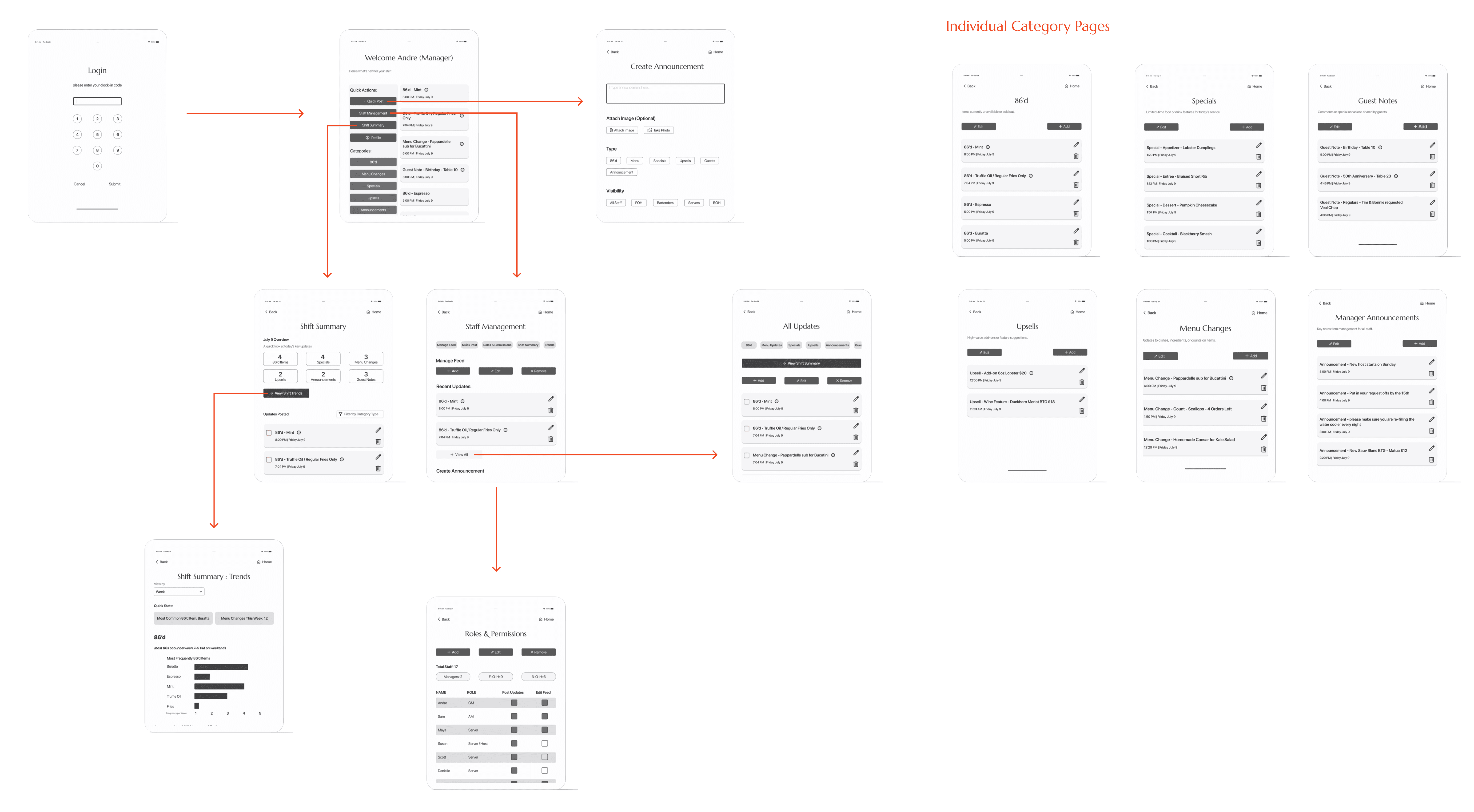
Building on persona and journey insights, I defined Tempo’s MVP structure to separate shared and role-specific tools clearly. The sitemap helped clarify navigation and ensure both managers and staff could quickly access what mattered most during and after a shift.
With the structure in place, I mapped the two most critical workflows—real-time updates from front-of-house staff and end-of-shift summaries from managers. These user flows reflect the distinct needs uncovered in research: servers prioritizing speed and immediacy, and managers needing visibility, patterns, and context over time.
Designing and validating these role-based flows early ensured Tempo supported fast decision-making without adding cognitive load during high-pressure moments. The flows also surfaced edge cases like offline posting and failed submissions, helping define system behavior before moving into higher-fidelity design.
Looking Ahead : Evolving Tempo beyond the MVP - Feature Roadmap
Now (Designed MVP)
Real-time Feed Updates
Create Announcement Interface
Shared Device Access
Offline Capability
Role-Based Visibility
Shift Summary Overview
Clear Update Categories
Timestamps & Unread Indicators
Next (Post-Validation Enhancements)
POS System Integration
• Offline Capability
• "seen by" acknowledgement
Later (Future Opportunities)
Manager analytics dashboard
Team recognition/reflection
micro-training / tips
Intelligence Insights
Multi-Location Management
While Tempo was explored as a concept supported by research and testing, this roadmap outlines how I intentionally scoped the designed MVP and identified future opportunities. “Now” represents features prioritized in the initial design phase, while “Next” and “Later” reflect how the product could responsibly evolve if built and validated in the real world.
Designing for Different Realities
With those insights in mind, I designed role-based dashboards shaped around daily priorities — rather than identical screens for every user.
Managers could:
Post updates
Track patterns like recurring out-of-stocks
Stay organized across shifts
Servers could:
Quickly scan shift-specific updates
See what changed most recently
Get back to service without digging
Because Tempo is often accessed during service, I designed the experience for shared tablet use — prioritizing large tap targets, clear hierarchy, and layouts that remain readable in low-light, fast-moving environments. Since staff don’t always have their phones readily available, a quick login code allows individuals to access role-specific updates and track what they’ve already seen, even on shared devices.
To reduce noise, I introduced clear update categories such as — Menu Updates, Guest Notes, and Announcements — helping teams filter information at a glance.
Validating Flows Before Branding
Before applying visual branding, mid-fidelity testing focused on how managers and staff navigate the system, interpret role-specific terminology, and locate critical updates through realistic task scenarios. While both roles were validated, manager workflows are shown here to highlight the most complex decision paths.
Testing surfaced opportunities to
clarify language
improve notification cues
refine filtering behavior
At the same time, testing confirmed that the underlying structure supported fast comprehension and confident use.
Creating calm in the middle of Chaos
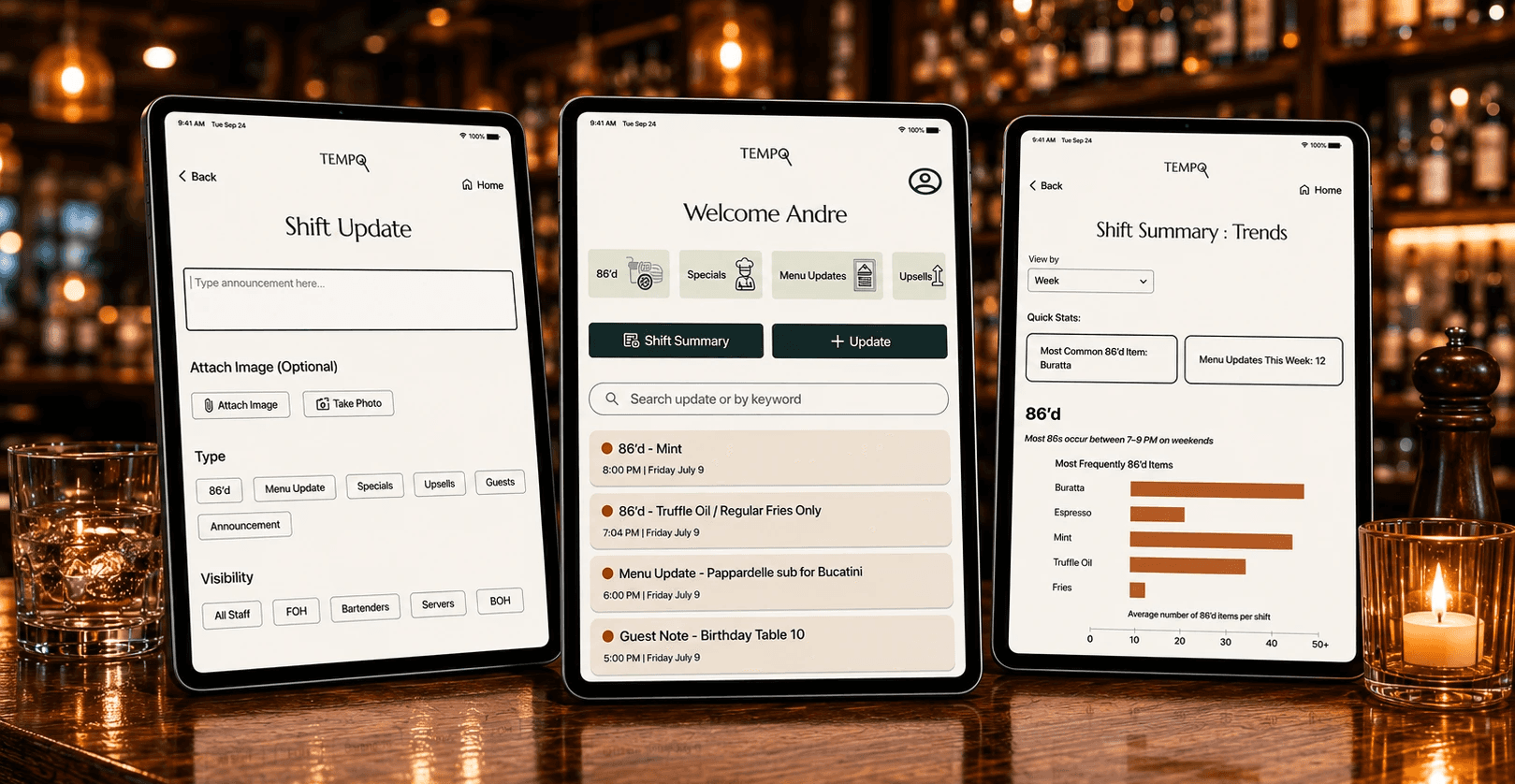
Tempo’s visual identity was designed to introduce clarity and steadiness into a fast-paced, high-pressure environment. Warm, grounded colors and easy-to-read typography help reduce visual noise, making critical updates faster to scan and simpler to process — even during a busy service.
The goal was to give users a sense of pause — almost like taking a quick breath — when locating the information they need. Clear hierarchy, restrained color use, and minimal branding choices work together to support focus rather than compete for attention.
The name Tempo reflects the rhythm of front-of-house work: once service begins, the team finds a groove, moving fluidly from table to table in a steady flow. The logo subtly incorporates a plate and fork, grounding the brand in the restaurant industry while keeping the mark familiar, functional, and unobtrusive in daily use.
Designing for Speed, Simplicity & Accessibility
Mid-fidelity testing revealed a consistent theme: less is more.
Five restaurant professionals completed navigation and comprehension tasks in Figma. While the overall structure tested well, feedback showed that unclear labels and extra elements slowed decision-making during service.
In response, I simplified terminology, removed ambiguous interactions, and streamlined flows to reduce cognitive load. Categories proved effective for quickly finding critical updates, while navigation patterns like Home and Back were validated as complementary.
These refinements shaped the first high-fidelity version of Tempo — creating an experience that feels clear, predictable, and supportive during high-pressure service moments.
Usability Testing
Task Completion
Goal: 80–90% of participants complete tasks without help
Result: 100% of users completed all tasks successfully
Ease of Use / Clarity Rating
Goal: Average rating of 4 or higher
Result: 4.8 / 5 average ease-of-use rating
Layout & Color Feedback
Goal: Positive response to overall visual feel
Result: Described as “calm,” “organized,” “earthy,” and “not busy”
Role Clarity
Goal: Clear distinction between Manager and Server flows
Result: All participants easily understood the difference between roles and their screens
Navigation & Label Understanding
Goal: Minimal confusion with navigation or terminology
Result: No major confusion; only small text clarity suggestions
Andre Task:
View Shift Summary Trends
Maya Task:
Create a "Quick Post" upload to All Staff
Refining through Testing
I ran two rounds of usability testing with both managers and servers using mid- and high-fidelity prototypes.
A few friction points surfaced quickly:
Users hesitated over unclear labels
Recent updates weren’t immediately obvious
Some navigation patterns felt unfamiliar under time pressure
In response, I reduced cognitive load by adjusting language, hierarchy and what mattered most in the moment.
Specifically:
Simplified labels using familiar restaurant terminology
Prioritized time-sensitive content at the top of each view
Reduced decision-making by clarifying hierarchy
I also refined micro-interactions — scroll feedback, button states, and transitions — to make the product feel faster and more responsive. Testers described the updated experience as “quicker” and “less cluttered.”
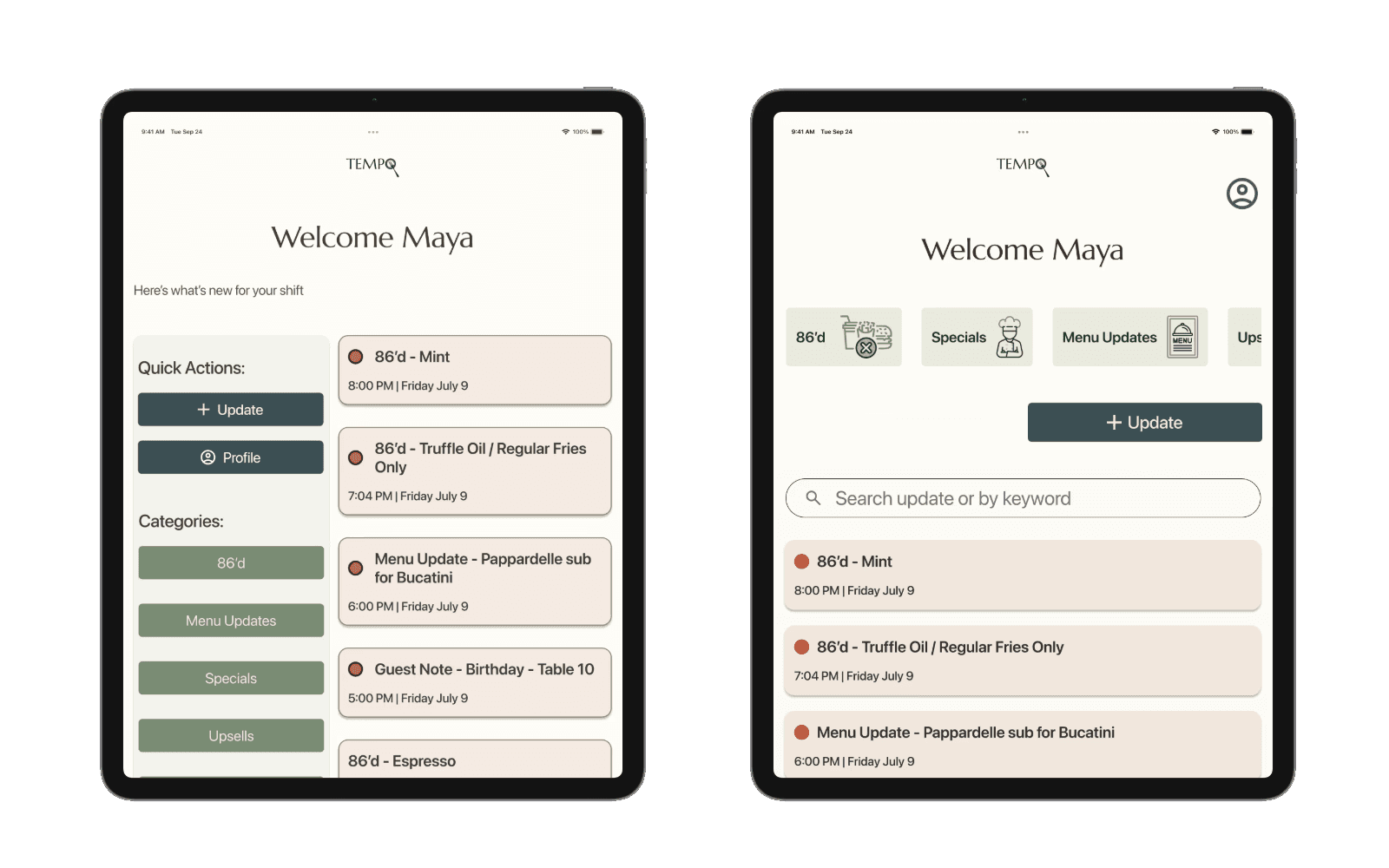
Dashboard Before & After
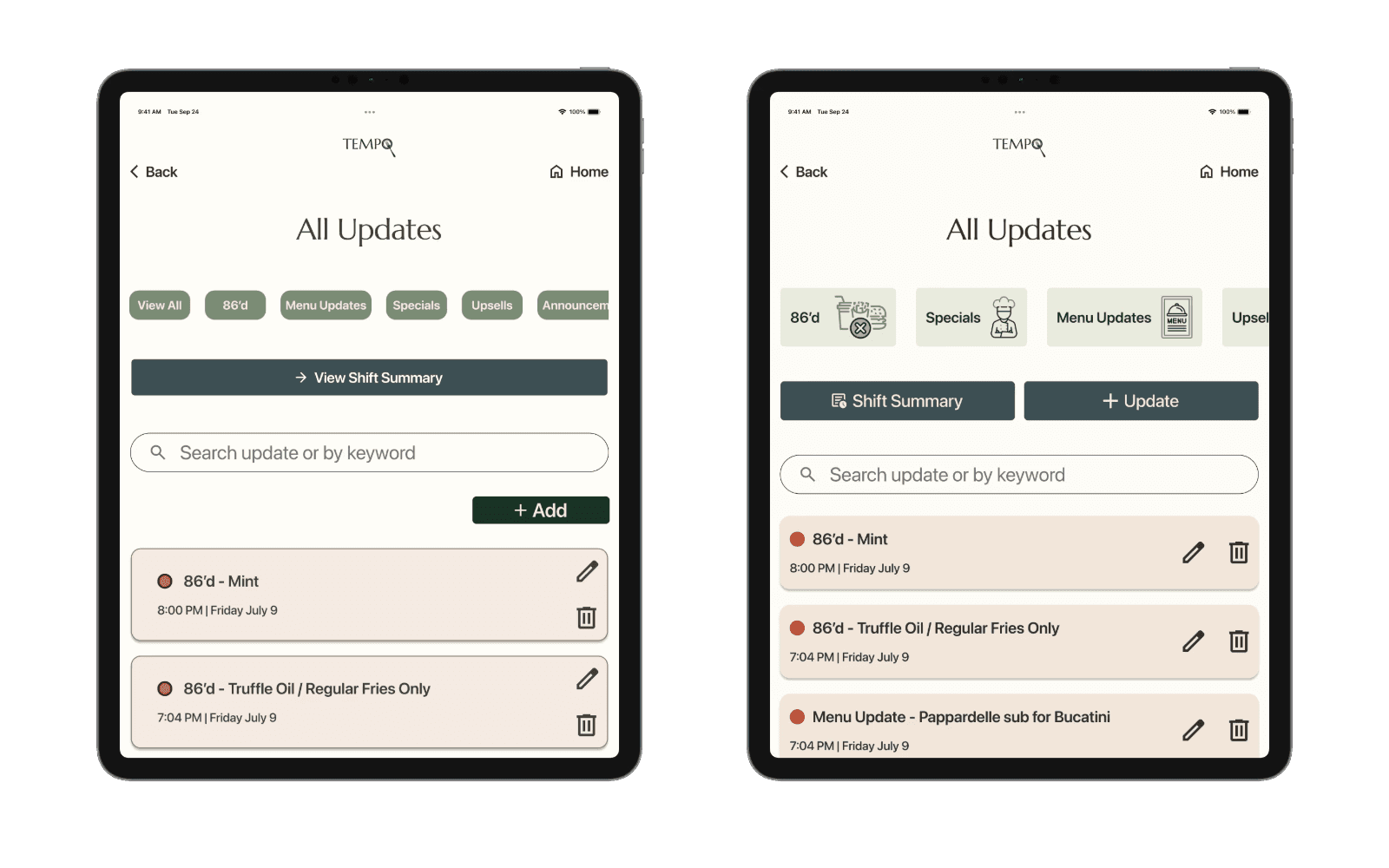
Update Cards Before & After
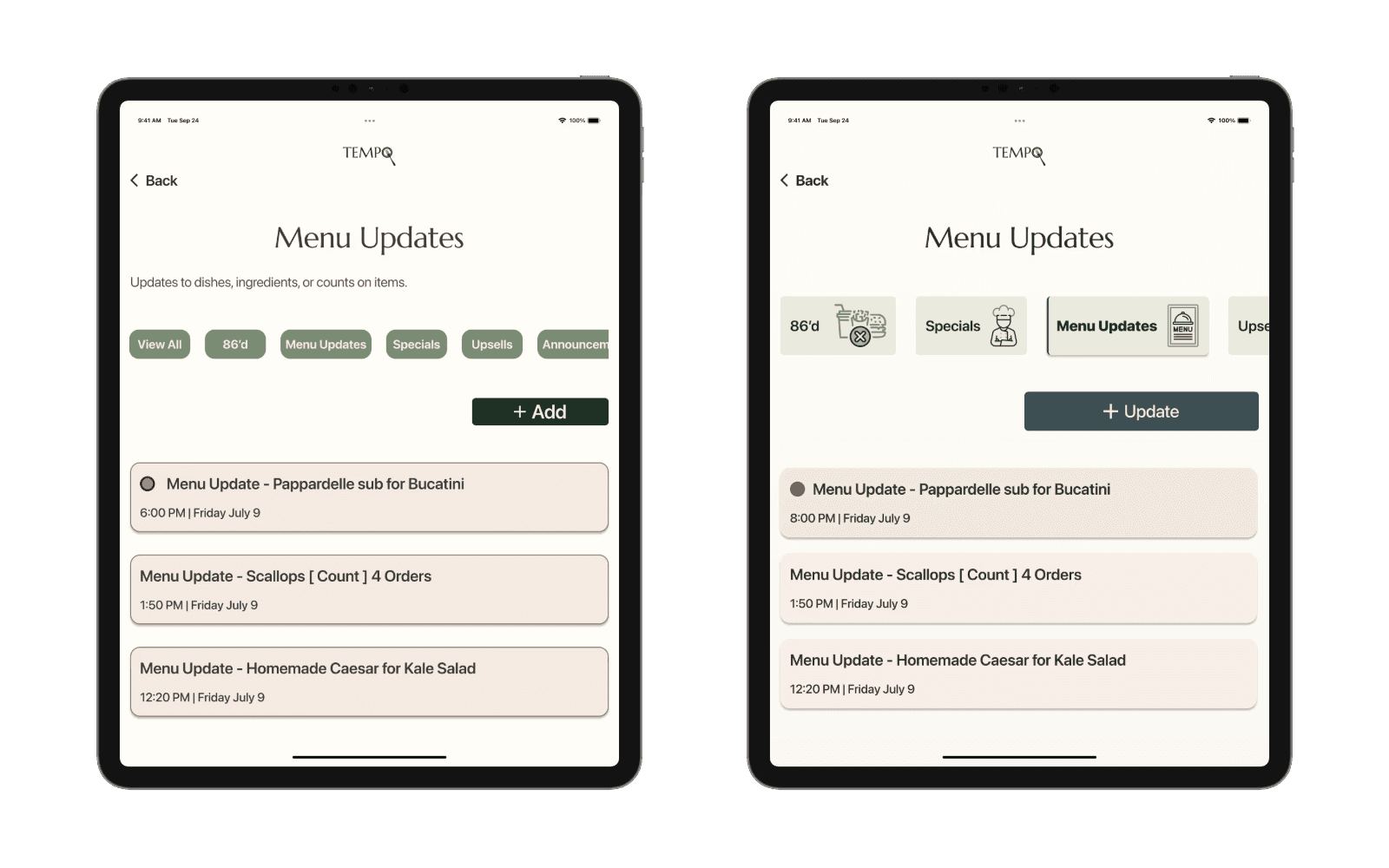
Category Chips + CTA
Before & After
Bringing Tempo to Life
Andre Final Design Prototype
Maya Final Design Prototype
Tempo demonstrated how a single source of truth could replace scattered communication with a single, trusted source of truth.
The prototype showed:
Real-time updates shared across roles
Clear visibility for managers into recurring operational issues
Faster, lower-stress information access for servers
I refined spacing, hierarchy, and component consistency to maintain a sense of visual calm across screens. Testing validated the core concept and surfaced clear next steps for future iterations — including analytics for managers and smarter update prioritization.
Ultimately, Tempo demonstrated how thoughtful design could reduce staff frustration, improve operational flow, and better support guest experiences.
Reflection
Designing for scale in restaurants:
If Tempo moved beyond a single team, I’d explore integrations with POS systems and support for multi-location restaurants.
Communication challenges grow quickly across locations, and designing for scale would require preserving clarity while handling more complexity behind the scenes.
Refinements - Balancing calm with Personality:
Keeping the interface calm & scannable was essential — but this project pushed me to question how minimal is too minimal.
If I revisited Tempo, I’d explore richer visual cues and more micro-interactions that add clarity & warmth without disrupting focus.
What this project taught me:
Tempo reinforced how closely restaurant work and UX design are connected: both rely on timing, rhythm, and anticipating needs before they’re spoken.
Designing for hospitality sharpened my ability to create experiences that support people when attention is limited and stakes are high.
Contact
Let's Make Something Great Together.
Thoughtful design is always collaborative - and the best work starts with a simple conversation.